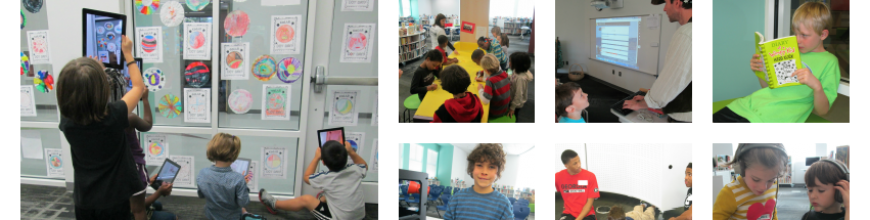

Our library makerspace has been a bustling place over the past few weeks. I’ve still been holding some periodic makerspace recess sessions where students can signup to come and explore the space and what it has to offer. Several students have been coming on a regular basis on their own. This started as one or two students asking to come and then those students told some other students. Before I knew it, I had a good problem on my hands. I’ve been trying to find a good way to organize the process of students coming to use the space on their own.
At the moment, the process is that students send me an email if they want to start using the space on their own. I make sure to put an appointment on the library calendar to introduce them to the space and set some parameters of what they can and cannot do. Once I feel like the student is responsible, he or she can start coming without an appointment but still needs to tell me the plan of which days to come. So far, this has been working with the exception of clean up and organization. Often, these students are in a rush because they are using recess time. Just when they get going with their making, it’s time to leave, so there’s little time to cleanup. This is on my agenda to figure out, but I will have some help with this very soon.

I’m partnering with Gretchen Thomas at the University of Georgia and some of her independent study students. As their project, these students will be coming each day of the week from 11-12:15. I will be able to tell students and teachers that they can come any day at that time. The UGA students will be responsible for creating a sign in sheet so that we can track which students are using the space. They will also monitor how often each student is coming. Although I love having kids come and use the space, I think it is still important that they spend some time outside. The UGA students will ask the students to limit their days so that there is space for others to try as well as time to go outside as well. The UGA students will also help me establish a routine for keeping the space in some sort of organization. Most importantly, they will explore alongside these students using the space. All of this starts next week!
Over the past week or so, some amazing things have been made and tried in the space. These have happened during our weekly enrichment clusters as well as these exploratory recess times.
A student spent time tinkering with LittleBits during enrichment clusters. He would try one combination of bits and it didn’t quite do what he wanted. He didn’t give up, and instead, kept trying different combinations until he made a type of microphone. His next step is to figure out how to make this something we could actually use without having to lean right into the bit to talk.
Other students tinkered with littleBits in different ways:


There has been a lot of exploration of MaKey MaKey by using existing tools online and controlling those with the alligator clips and playdoh.


A challenge has been getting students to move beyond using the MaKey MaKey with existing tools and stretch their thinking to designing their own programs that can be controlled by the tool. We finally had a breakthrough this week as some students began designing things in Scratch and controlling it with MaKey MaKey.

Several students have been bringing in their own maker tools to share with the makerspace and classmates. One student brought a robotic dog that can be controlled through an app and another student brought his snap circuits. The Snap Circuits were very popular and students were screaming when they figured out how to snap pieces together to create an AM radio.

I’m still seeing a lot of tinkering with Sphero. The students love driving Sphero around and playing the various games, but this is another tool where I want to nudge students to begin programming. I think they need this experimental stage, but I know they can create amazing things once they get going.


I’ve seen a lot of interest in duct tape. This is the one area where I’ve seen students read the instructions in our duct tape books as well as watch videos about making things with duct tape in order to design something. Now, a group of students have branched off to start making their own creations from duct tape. One student made a flower from tape and then decided to add it to her headband.
A student just made a duct tape headband. #makered #tlchat #ccsdath http://t.co/Unua5BCghs—
Andy Plemmons (@plemmonsa) January 28, 2015


So far, I feel like our 3d printing has been very teacher directed. Because of safety concerns, I’m afraid to let elementary students use the 3D printer alone. Now, though, I have some students who are really capable of this. They know how to design something in tinkercad, export to Makerware, slice for 3d printing, save on an SD card, load the SD card, and get the print started. I was startled one day when I heard the 3d printer start, and when I raced over to see what was going on a student had gone through this whole process alone. I did remind him that due to safety I really wanted to be around when something was 3d printing, but I was also proud that an elementary student was able to go through all of the steps to print something. Now, he has passed on that expertise to several other students. Their designs are very simple at the moment, but I think they will get more complex as they tinker with the tool more and more.


I’m excited that Gretchen Thomas is bringing yet another fun tool for us to try when she comes next week: Google Cardboard. It’s sort of silly, but it’s a cardboard viewfinder that you stick your phone inside in order to create your own virtual reality on a budget. Since Cardboard doesn’t officially support iPhones, we also used our makerspace to print an attachment from Thingiverse that will let us use our iPhones for the cardboard tinkering.
Ready for #googlecardboard @ilovethisclass @techwithtodd http://t.co/Ad6tF2Qv2D—
Andy Plemmons (@plemmonsa) January 29, 2015
I’m still pushing to weave makerspace into classroom curriculum, and I think a next step is going to be to hold some informal teacher exploration time. I think if teachers give themselves permission to tinker and explore, they will immediately start to see a use for their classrooms.
It is overwhelming and promising to see how many independent projects there are in our school and that students are coming to the library as a place to work on these projects. I was amazed when I paused and took a quick look around.


