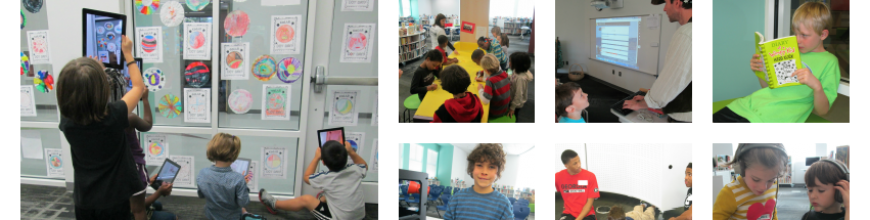
Kindergarten Narrative Writing Using Chromville Augmented Reality (and a little Skype too)

IMG_2789 IMG_2804Kindergarten is revisiting narrative writing at the close of the year.  This year, they have also worked very hard on the standard

ELACCKW6 Production and distribution of writing: With guidance and support from adults, explore a variety of digital tools to produce and publish writing, including in collaboration with peers.

With this standard as our guide, we have explored tools such as Storybird, Padlet, and Flipgrid to publish our writing.  We’ve also used digital tools such as Pebble Go and the Capstone Interactive Library to gather information for our writing.

The Kindergarten teachers wanted to try one more digital tool, so I met with them to brainstorm.  We tossed around a lot of ideas, but we ended up deciding to try a brand new tool called Chromville.  Chromville is an augmented reality app that was just released this year.  It offers 6 different coloring pages.  Five of the coloring pages have a setting and a character and the sixth coloring page is a “create your own” character with no setting.  First you color your page.  Then, you use the Chromville app to select the matching setting and scan the page.  Once the screen turns green and you wait 3 seconds, the character and setting come to life on the iPad and the character begins to move around and interact with the setting.

IMG_2928 IMG_2933

From my own experience with Kindergarten students, I’ve seen how visual they are, and I thought that seeing their character and setting in an interactive way might give them enough ideas to begin imagining their own stories.  The teachers and I mapped out what we would do in the library and in class.  It looked something like this:

  • In class, choose a setting and color it.
  • In the library, use the iPads and the Chromville app to see the setting come to life and brainstorm what to write about.
  • In class, begin the writing process by describing the character and setting as well as thinking about 3 events and a reaction that might happen in the story.
  • In the library, use the iPads to look at the Chromville character and setting again for more brainstorming and continue the writing process, including revision and publishing.
  • In class and in the library, share the final stories.
  • In the library, do a gallery walk of the all the stories by scanning the Chromville setting and reading the accompanying story

Four of the Kindergarten classes went through this process and it was very exciting to watch.  I saw some of the longest stories by Kindergarten students that I have ever seen.  Chromville was an exciting and motivating tool for them to use and they were full of energy when using it.

IMG_2932 IMG_2921 IMG_2778

We did learn a lot about what to do differently next time.  For example, we will probably opt to use crayons or color pencils next time rather than markers.  We will also avoid black as a color since the lines of the coloring page are black.  These black lines are the instructions for the iPad to read in order to generated the augmented reality scene.  Students also need to be careful not to cross over too many of the lines or color so dark that the black lines can no longer be seen.

IMG_3053 IMG_3052

Along the way, we shared our success (and our failures) with Chromville, and they were eager to learn with us.  We sent them images of pictures that didn’t scan for us and they started taking a look at them to better improve the app.

chromville skype (2)

Today, Mrs. Boyle’s class Skyped with them all the way in Spain.  It was so much fun to Skype with someone in another country, but it was even cooler to see the improvements that they are working hard to create for the next update of Chromville.  We even got to see some upcoming Chromville projects as well as other augmented reality projects that the team is working on.  We loved seeing how even a t-shirt could be a part of an augmented reality project.  During the Skype, we also heard them talk about the improvements that they are making to the app.  This was such a great connection to the writing revision that students had just gone through.  It also validated all of the feedback that students have given about the app over the past few weeks.  They heard from the developers that their feedback was making a difference.

chromville skype (4) chromville skype (5)

We selected one student from each of the Chromville settings to share their stories with the Chromville team.  Each student showed his/her coloring page first and then read the story.

chromville skype (10) chromville skype (15) chromville skype (13) chromville skype (12) chromville skype (17)

Chromville currently has a narrative writing contest going on using the Greenland setting but Kindergarten is not eligible to enter.  This was a way to still honor their work and let the good people at Chromville hear how fantastic a Kindergarten story can be too.

chromville skype (19)

This is definitely a project we will try again.  I’m thankful for Kindergarten teachers who took a risk with me to try something totally new.  As usual, things didn’t work perfectly along the way, but that’s usually where some of the best learning happens.  Even though there were some tears, it was a great lesson that things aren’t always perfect and we have to push through failure and learn from it in order to be innovative.


Letting Kindergarten Imagination Soar with Blokify and Makerbot

blokify (4)Mrs. Kelly Hocking’s Kindergarten class just started a collaborative project with the art teacher and the media center.  Her class has been very inquisitive about structures and sculptures and what it’s like to be inside of those structures.  For example, they’ve looked closely at the Statue of Liberty and they are fascinated with the idea of going inside and looking out from the crown.  In art, Mrs. Foretich is introducing maquette sculpture which is a small scale model of a rough draft or unfinished work.  It allows them to test how different shapes are put together without making a full sculpture.

blokify (10)

These 2 ideas started coming together in a project.  Mrs. Hocking started exploring Minecraft at home and thinking about how worlds and structures were created in the virtual world.  Then she started wondering how this might flow into the discussions her class was already having about imagining and going inside of structures.  This is when we started talking about Blokify as a tool for putting together blocks to create a larger structure.

Mrs. Kelly, the art teacher, and I all met to brainstorm.  Students will eventually build a larger sculpture out of shapes in art.  Their art standard is:

GPS: Demonstrates that shapes can be put together to make new shapes or forms.

Their essential question is:

How do artists build Sculptures?

We decided that we would start our journey with Blokify.  Blokify is a free iPad app that allows students to put a variety of blocks together to build pretty much anything and then 3D print that shape.  The files can be emailed for download into your own software for 3D printing conversion.

We decided that Blokify would be the kickoff to this larger project.  In the library, Mrs. Foretich, our art teacher, showed students some examples of maquettes and talked about how artists might make a rough draft of a larger sculpture to test some things out before making a larger sculpture.  Then, we showed students some images from Blokify’s facebook page to give students the idea that you don’t just have to make a box in Blokify.

photo 1 photo 2 photo 3


After that, students went straight to iPads and jumped in.  We didn’t spend a lot of time “teaching” them how to use the app.  Instead, we let them explore.  We also didn’t tell them what to build because we wanted them to have permission to imagine and dream as they built.  Mrs. Foretch and I walked around to tables and showed students some tips as they worked.  For example, if you hold your finger on a block it will disappear.  If you pinch the screen, you can zoom in and out.

Two of my enrichment cluster students came to support students as they worked, too.  Monica, 5th grader, and Grant, 3rd grader, were naturals at nudging Kindergarten students along without doing the work for them.  We were almost able to have a helper at every table because of them.  I was so glad that their teachers allowed them to come and share their expertise with Kindergarten.

Some students started really being strategic about where their blocks went in their structures while others liked tapping all over the screen and seeing how it turned out.  We did question a bit if we didn’t give student enough guidance, but we ultimately decided that they really needed this time to explore.  If our prints don’t quite turn out like they hoped, then it will be a learning experience about how they might rethink their own approach to designing.

blokify (13)

As always, there were some wonderful moments that happened.  One moment was when  a student who we’ve all been trying to find the right learning method was thoroughly engaged.  He was so proud of the work he did, and he showed us a way to connect with him as a learner.  I  hope that this new discovery will lead to other projects and learning experiences for him in his classroom.

blokify (6)

After students left, I had a group of 5th grade helpers email me all of the files from the iPads.  I put each file into Makerware, resized it, and saved it onto an SD card for printing.  We will print our designs after spring break.

blokify (3)

Once designs are printed, Mrs. Hocking wants students to put their structures on a piece of paper and draw the rest of the setting around the structure.  From there, students will think about the inside of their structure as well as the surroundings and begin to tell a story about their creations.  We aren’t sure yet how that piece will be captured, but I’m excited about the possibility.

In art, Mrs. Foretich will continue to explore this standard by expanding what students are building.


Exploring Chinese New Year with Kindergarten: Google Voice Search, Pebble Go, colAR Mix, and More

BeghKH6IAAAZUVXMrs. Li’s Kindergarten class has been exploring the Chinese New Year with me in the library.  During our exploration, we’ve tried out several resources for information.  First, we used Capstone’s PebbleGo database to do some pre-reading for background information.  We did this with little discussion about the holiday, but instead just focused on listening to the information to build some shared knowledge.

pebble go

Next, we thought of questions that we had about the Chinese New Year that were possibly not answered by PebbleGo.  We asked things like:

  • When is Chinese New Year this year?
  • When is the lantern festival?
  • Where is it celebrated?
  • How is it celebrated?

Before students came, I installed the Google Voice Hotword Search extension in Chrome.  This allowed us to control a Google search with our voice.  For Kindergarten students who aren’t fluent in typing, this lifted a big search barrier for them.  We took our list of questions and took turns saying:

  • “OK Google”
  • When is the Chinese New Year?

Google searched and spoke to us telling us that this year Chinese New Year begins on January 31st.  We continued this process to answer many of our questions.

IMG_1806[1]

Next, we used Grace Lin’s book Bringing in the New Year to continue our exploration.  Many facts that we had already discovered were confirmed in the text, but the book allowed us to learn some of the family structure in China and what different family member roles are.  Mrs. Li was able to help us with this part of the lesson.  Since I wasn’t sure how to pronounce some of the words, she pronounced them for us and also explained the meaning of each family member’s name.  We certainly could have used Google for this, but we had a conversation about choosing resources to answer our questions.  Since Mrs. Li was with us in the room and is an expert in Chinese culture, she was a faster option for us than taking the time to go to Google.  It’s never too early to begin surfacing the thinking process that we go through as learners when we are trying to find the answers to our questions.

During the 2nd lesson, we once again used the Google Voice Hotword Search to explore the Chinese Zodiac.  We learned that 2014 is the “Year of the Horse”.  Students were curious about their own birth years, so we used Google to look for the signs for each of their years too.  From here, we spent some time coloring a colAR mix coloring page for Chinese New Year.  Students used the iPad app to view their carousel creations.  The app uses augmented reality to bring coloring pages to life.  The carousel pops off the page and rotates to music with they year 2014 in front of the carousel.  Students were mesmerized by their coloring page brought to life.

We explored so many skills and tools in just 2 lessons.  I want to continue this transliterate thinking of how our students can experience content across multiple platforms.  In these 2 lessons, we examined print, databases, websites, search engines, crayons/markers/paper, and augmented reality.  I’m curious to ask students later what they remember about Chinese New Year and see what stands out in their minds from these 2 days.

Observing the Day & Night Sky with Kindergarten

IMG_1377Kindergarten is working on observing the day and night sky in science, and they want to use technology to document their observations.  They are working on the following standards:

ELACCKW6 digital tools help writers write and share their stories.

ELACCKW7 writers work in groups.

SKE1 Students describe time pattterns (such as day to night and night to day) and objects in the day and night sky.

Classes came for 2 separate lessons.  During our 1st session, we used Capstone’s Pebble Go to read about day and night.

PebbleGo - Capstone Digital

Then, we read the book Sun Up, Sun Down: The Story of Day and Night by Jacqui Bailey.  During our reading of both Pebble Go and the book, students discussed the scientific reasons we have day and night.  We setup the idea of starting to “notice” things about the sky and how it changes during the day and night.

IMG_1376For our 2nd session, I opened up the blinds on our massive library windows and setup observation areas for students.  We started our time together on the floor and shared some observations we had already made at recess or at home.  We practiced saying aloud what we would write on our clipboards at the windows.  Next, the teacher paired the students together, gave them a clipboard with paper and pencil, and I placed groups in front our our windows.  The teacher, parapro, and I walked around and talked with kids about what they saw.  We encouraged them to write and sketch.  We also helped them make connections to the information that we had learned from Pebble Go and our book.  For example, the sun was blinding us in the windows on he left side of the media center but on the right side of the media center it was shady.  We remembered that the sun is at different positions in the sky throughout the day due to the Earth rotating.

Day & Night Sky Observations

At the end, we split the class in half at our 2 projection areas.  Student groups shared what they observed and we used Padlet to capture the observations.  I tweeted the link to our padlet and later in the day Margaret Powers, Mrs. Keating, and Mrs. Bolster and their students added to the wall from Pennsylvania.  It was interesting to hear about the cloud-filled sky there compared to our cloudless sky in Georgia.

Now, the Kindergarten teachers will share this link with families and encourage them to add notes to the Padlet from home.  This will allow students to make some observations of the night sky.  Please feel free to leave some comments on the Padlet about what the sky looks like where you are!

Kindergarten Storybirds

Two Kindergarten classes just finished a writing project using Storybird.  Storybird allows a user to select illustrations for a story, sequence them, and add text to create a book.  Any time we plan a project like this, we consider what the barriers are to artistic expression.  For Kindergarten, some of the barriers included:

  • limited knowledge of technology use due to lack of technology in that grade
  • the ability to read the text of stories that could be mentor texts
  • writing the story vs. telling the story orally

To lower the barriers, the teachers and I planned a series of lessons and opportunities to support the students.

Lesson 1:  Spend time revisiting the 3 ways to read a story:  read the words, read the pictures, retell.  Focus on reading the pictures by looking at a wordless book together.

In between lessons:  In class, students practiced telling stories from wordless books in small groups, alone, and at centers.

Lesson 2:  Look at a sequence of 3 pictures and think about a beginning, middle, and end for those pictures.

Lesson 3 (or part of lesson 2):  Look at Storybird.  Choose a topic  of pictures, like pumpkins, and choose 3 pictures to sequence that could be the beginning, middle, and end of a story.  Write the story together as a class with time to pair share ideas.

Lesson 4:  In small groups with adult support, students created a group Storybird project.  We made as many groups as we had adults.  For one class this was 4 groups and for the other it was 5 groups.  The adult’s role was to facilitate the conversation of the students and make sure each voice was heard in the group.  The adult also typed the story for the students as they told the story.  The students were supposed to show the adult what to click on at each step of the project.

In between lesson:  One group at a time came to the library and used Screencastomatic to record the audio of their story.  If students had difficulty reading the words, we whispered the words to them and they repeated them.   Videos were uploaded to Youtube.

Lesson 5:  The whole class came to the library for a premiere of their audio ebooks!


You can enjoy all of their books here!


Rhyming Words and Storybird

Our Kindergarten students have been learning about rhyming words.  For our library lesson, we read two different stories.

Storybird - Say What-! (Our Version)For our first story, we read Cats’ Night Out by Caroline Stutson.  Students gave me a thumbs up when they heard rhyming words.  Sometimes we paused and they told a partner the rhyming words they heard.  Other times we shared them aloud to the whole group.  We also took time to notice that there was a counting pattern in this book, counting by twos.

For our second story, we read Say What? by Angela DiTerlizzi.  This book explores the sounds that animals make and thinks about what animals might really be saying when they make their sounds.  This book sets up a great pattern that students can model in their own writing.cats' night out

For our work time, I put together a Storybird to use with all of the classes that participated in this lesson.  I searched for animal pictures within Storybird and pulled a few onto each page of the book.  Then, I typed the sentence starters for each animal.  “When a _______________ says _______________ does she really mean _________________________?”  Each class brainstormed rhyming word pairs for each animal picture.  It was about 2-3 pictures per class.  After the final class, we had written a collaborative ebook.  I emailed the link to all of the teachers so that students could see how the book turned out.

This lesson also served another purpose.  It was an authentic way to show a web tool that students would be using in the future.  Rather than teach about making a Storybird, students saw a Storybird in action.  Now, when we actually look at some of the steps, they’ll have a concrete example of a finished product to reference.  This was the first time that I have tried this, and I’m curious to see how it will impact future Storybird projects.

Read their final version of the story here.

Book Tasting with Kindergarten Using IPICK

ipick kinder (3) The Daily 5 I-PICK Strategy is a tool that many of our teachers use with students to find a “just right” book.  I’ve found this strategy to be so much better than using the 5-finger rule because it takes into account the many ways that we all choose books.  Usually 1st grade teachers are among the first to teach this strategy, but this year Kindergarten is very interested in what this might look like for our youngest students.

I-PICK stands for:

  • I choose my books
  • Purpose:  Why am I reading?
  • Interest:  What do I like to read?
  • Comprehend:  Do I understand?
  • Know:  Do I know most of the words?ipick kinder (4)

For Kindergarten, most of these pieces are obtainable except for knowing most of the words.  We’ve also been teaching the students the ways that we read which have included reading the pictures, reading the words, and retelling the story.

After some email conversation with a Kindergarten teacher, I proposed that we leave off the “know” part of IPICK for most of the students.  In class, students reviewed all of the steps of IPICK, but they specifically focused on “interest”.  Each student was interviewed about what they like to read and the teacher and other helpers wrote down about 3 interests for each student.  These cards were then given to me in the media center.

IPICK Kinder (10)I took each card and created a personal stack of books for each student.  I tried to find books that matched the interest and had plenty of pictures for students to practice reading pictures in a book.  I won’t lie.  This was very time consuming.  It took me about 45 minutes per class to pull books.  However, for the first time I could honestly say that I helped every student in a class find the books that they were interested in.

We kept our lesson very short.  On the floor, I reviewed IPICK and set our focus on comprehension.  We looked at some previously read books like Chalk to remind ourselves how to read the pictures in a book.  We also looked at informational text to practice reading a photograph and attempting to read the captions on pictures.

Just like in a cafe where you place your order and they call out your name, I called each student’s name and handed them the stack of books.  I reminded them that sometimes in restaurants we don’t like what we ordered and that it is ok to send it back or spit it out.  I reminded them that they would probably find several books that they liked but they needed to pick the one that tasted the best.IPICK Kinder (9)

As students sat at tables, the teachers and I walked around and had conversations with students about their books.  They told us what they were reading in the pictures.  If we saw a student quickly breezing through pages, we had a longer conversation and modeled how to slow down and carefully read a picture.  I loved how finding the book didn’t get in the way and we were actually able to have quality conversations rather than spending our time running around the shelves looking for books.

ipick kinder (6)In the end, each student chose a book.  When we asked them why they chose the book, interest was usually the winning reason.  It just reminded me of how important it is for students to find the books that they love to read even if it is Spongebob or Disney Princesses.  Every student left with a smile on their face.  I know that students missed the experience of actually finding the book on the shelf, but in the end, I felt like this experience was positive and rewarding in other ways for the students.  This is not something that I would or could do for every session, but I think it’s important for students to come to the library and find the perfect match of a book at least part of the time.ipick kinder (1)