First Grade’s Fun Skype with Crabtree Co-creator, Jon Nichols

IMG_3166Our community amazes me.  Every year, new people within our school community step forward with ideas for our library program.  People share their talents, their connections, and their love of education.

This year, Rachel Gabara, a parent of a 1st grader, introduced me to a new book called Crabtree by brothers Jon and Tucker Nichols.  I’ll admit that it was my first time hearing of the book, but when I looked at the praise for Crabtree on the McSweeney’s website, I was floored.  Authors like Jon Klassen, Maira Kalman, Lemony Snickett, and Jon Agee all raved about the book.  I immediately ordered it from Avid Bookshop.  When I got it, I was raving about the book as much as the reviews.  It is jam packed with illustrations of all kinds of things.

Here’s the official trailer:

Crabtree loves to collect things.  The problem is that he has so much stuff he can’t find anything.  He begins to organize his collections of stuff in order to find his false teeth.  Each object on the page is labeled with its name, so kids are introduced to all kinds of tools and gadgets that they’ve probably never heard of.  It’s a great books just for the sorting, vocabulary, and potential research opportunities.  However, the humor and gadgets of the book are what really make it so much fun to read over and over again.  Even the dust jacket of the book has a collection of gadgets and unfolds into a poster.  At the end of the book, there’s a game where you can go back through the book finding various objects.  You need to order a copy of this book today.  It’s so much fun.

IMG_3169 IMG_3170

When Rachel introduced me to the book, she told me that she was friends with the co-creator, Jon Nichols.  She offered to reach out to him to see if he would Skype with us.  He agreed, so we got to work preparing for our visit.  All of the 1st grade classes read the book in advance and pulled in some categorizing and math standards along the way.  Students also spent some time writing out questions for Jon.

IMG_3173 IMG_3175

Today, the whole 1st grade came to the library and we connected with Jon in California.  He was a fantastic Skype author full of energy.  He told the kids a bit about how he and his brother made the book together.  Both of them were involved in the writing and illustrating process, and it was their first book.

Then, Jon showed the kids how he draws Crabtree.

IMG_3176 IMG_3177 IMG_3178

The students loved it when Jon let them ask him some questions.  When authors do this, the teachers help me a lot.  They start choosing students from the audience to start forming a line to the side of the screen and camera.

IMG_3186

As they get in line, we try to check to make sure the questions are all different and are actually questions.  I move the camera down to student-level.  Then, students take turns speaking to the author directly into the camera.

Today, students asked Jon questions like:

  • What kind of paint did you use?  He showed us the pens used to draw the illustrations and we learned that the colors were created by computer at the publisher because they didn’t like how real paint looked on the paper.

IMG_3183

  • Why did you call him Crabtree?  We learned that it was a mixture of a favorite place to visit but also the idea of 2 things that don’t really go together: crabs and trees.
  • Can 1st graders write books?  Jon was so enthusiastic in his answer and told them that they could absolutely write books.  He ran through the whole writing process and got them excited about their ideas for stories.

IMG_3459 IMG_3189 IMG_3188

There were many more wonderful questions.  I was really surprised by how well 1st graders asked questions.  The teachers did a wonderful job giving students time to think and write their questions down before they came.

We are so thankful to Jon for taking time out of his busy day to connect with us.  If you haven’t read Crabtree yet, we highly recommend it.


Kindergarten Narrative Writing Using Chromville Augmented Reality (and a little Skype too)

IMG_2789 IMG_2804Kindergarten is revisiting narrative writing at the close of the year.  This year, they have also worked very hard on the standard

ELACCKW6 Production and distribution of writing: With guidance and support from adults, explore a variety of digital tools to produce and publish writing, including in collaboration with peers.

With this standard as our guide, we have explored tools such as Storybird, Padlet, and Flipgrid to publish our writing.  We’ve also used digital tools such as Pebble Go and the Capstone Interactive Library to gather information for our writing.

The Kindergarten teachers wanted to try one more digital tool, so I met with them to brainstorm.  We tossed around a lot of ideas, but we ended up deciding to try a brand new tool called Chromville.  Chromville is an augmented reality app that was just released this year.  It offers 6 different coloring pages.  Five of the coloring pages have a setting and a character and the sixth coloring page is a “create your own” character with no setting.  First you color your page.  Then, you use the Chromville app to select the matching setting and scan the page.  Once the screen turns green and you wait 3 seconds, the character and setting come to life on the iPad and the character begins to move around and interact with the setting.

IMG_2928 IMG_2933

From my own experience with Kindergarten students, I’ve seen how visual they are, and I thought that seeing their character and setting in an interactive way might give them enough ideas to begin imagining their own stories.  The teachers and I mapped out what we would do in the library and in class.  It looked something like this:

  • In class, choose a setting and color it.
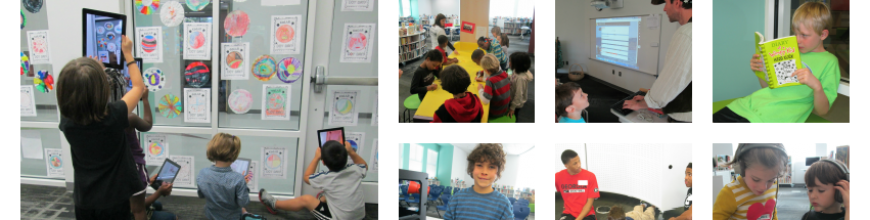
  • In the library, use the iPads and the Chromville app to see the setting come to life and brainstorm what to write about.
  • In class, begin the writing process by describing the character and setting as well as thinking about 3 events and a reaction that might happen in the story.
  • In the library, use the iPads to look at the Chromville character and setting again for more brainstorming and continue the writing process, including revision and publishing.
  • In class and in the library, share the final stories.
  • In the library, do a gallery walk of the all the stories by scanning the Chromville setting and reading the accompanying story

Four of the Kindergarten classes went through this process and it was very exciting to watch.  I saw some of the longest stories by Kindergarten students that I have ever seen.  Chromville was an exciting and motivating tool for them to use and they were full of energy when using it.

IMG_2932 IMG_2921 IMG_2778

We did learn a lot about what to do differently next time.  For example, we will probably opt to use crayons or color pencils next time rather than markers.  We will also avoid black as a color since the lines of the coloring page are black.  These black lines are the instructions for the iPad to read in order to generated the augmented reality scene.  Students also need to be careful not to cross over too many of the lines or color so dark that the black lines can no longer be seen.

IMG_3053 IMG_3052

Along the way, we shared our success (and our failures) with Chromville, and they were eager to learn with us.  We sent them images of pictures that didn’t scan for us and they started taking a look at them to better improve the app.

chromville skype (2)

Today, Mrs. Boyle’s class Skyped with them all the way in Spain.  It was so much fun to Skype with someone in another country, but it was even cooler to see the improvements that they are working hard to create for the next update of Chromville.  We even got to see some upcoming Chromville projects as well as other augmented reality projects that the team is working on.  We loved seeing how even a t-shirt could be a part of an augmented reality project.  During the Skype, we also heard them talk about the improvements that they are making to the app.  This was such a great connection to the writing revision that students had just gone through.  It also validated all of the feedback that students have given about the app over the past few weeks.  They heard from the developers that their feedback was making a difference.

chromville skype (4) chromville skype (5)

We selected one student from each of the Chromville settings to share their stories with the Chromville team.  Each student showed his/her coloring page first and then read the story.

chromville skype (10) chromville skype (15) chromville skype (13) chromville skype (12) chromville skype (17)

Chromville currently has a narrative writing contest going on using the Greenland setting but Kindergarten is not eligible to enter.  This was a way to still honor their work and let the good people at Chromville hear how fantastic a Kindergarten story can be too.

chromville skype (19)

This is definitely a project we will try again.  I’m thankful for Kindergarten teachers who took a risk with me to try something totally new.  As usual, things didn’t work perfectly along the way, but that’s usually where some of the best learning happens.  Even though there were some tears, it was a great lesson that things aren’t always perfect and we have to push through failure and learn from it in order to be innovative.