Black History Month Research and Persuasive Commercials in 2nd Grade

IMG_1815Second grade has been working on a big research project.  Each student selected one of five African Americans to research.  Rather than write a traditional informational paper on their person, the 2nd grade teachers and I decided to weave persuasive writing into the project.  Students would think about which historical figure should be on a next US postage stamp and would create a persuasive commercial to convince an authentic audience to vote for their historical figure.

We actually began our project with persuasion.  Students spent time talking with one another about what it means to persuade.  They mentioned things like:

  • convince someone to do something
  • get someone to get something for you
  • make someone change their mind

Anytime I teach persuasive writing, I want kids to leave with an understanding that persuasive writing isn’t just about getting someone to get something for you.  It’s one of the most powerful kinds of writing that can bring about change.  However, many kids connect with the idea of commercials and convincing their families to buy something for them, so we often start there and expand.

We watched a commercial of one of this year’s hot holiday toys, the Flutterbye Fairy.

IMG_1814We used this commercial to think about a structure for persuasion.  Students first noticed what we called a hook at the beginning.  “Can you keep a secret?” was a phrase that hooked our attention to want to watch the rest of the commercial.  We noticed that the rest of the commercial showed us just how easy it is to use the fairy, so this was like giving the facts about what you are writing about.  Finally, we noticed the closing line “the magic is in your hands”.  This was a phrase that would stick with us long after we watched the commercial.  In fact, I told the students that my own daughter uttered this phrase the first time she flew her own Flutterbye fairy, so I knew it was a phrase that stuck in your head.

To continue our exploration of persuasion, we read Melanie Watt’s Have I Got a Book For You.  This book uses just about every persuasive technique that you can think of.  We noticed these techniques along the way and folded them in to our noticings from the fairy commercial.

After this initial exploration of persuasion, students worked some in their classrooms.  They selected the African American they would research and got a graphic organizer to located some basic facts about their person.  We referenced the fairy video and how important facts are when you are persuading.

IMG_1813Students spent time in class and in the library using several tools to research.  I did a quick mini-lesson on using PebbleGo, Galileo’s SIRS Discoverer, and Galileo’s Britannica.  All of these tools had text to speech features to support learners of all reading levels.  During this mini-lesson, I also stressed how research is never really “done”.   You just reach a point where you feel like you have enough to tell your story.  Adults circulated and conferenced with students on their progress as they researched.  I loved that not many said “I’m done”, but when they did, we gently reminded them that research is never really done.

IMG_1812Now students are pulling their facts together, creating hooks, and coming up with a great closing like “the magic is in your hands”.  Once they have these scripts written, we will move forward with the next part of this project which will involve recording commercials in Flipgrid and creating a Google form for voting on which commercials are the most persuasive.  I’m compiling all of this onto a Smore which will populate with information in the coming days.

IMG_1811

Chatterpix Book Talks with 2nd Grade

A few weeks ago, Okle Miller, a librarian near Tampa FL, shared a great iPad app with me that she had discovered on Richard Byrne’s site iPad Apps for School.   Chatterpix allows you to take a photograph with your iPad, draw a mouth on that photo, and record up to 30 seconds of dialogue for the photo.  The mouth moves in sync with your voice.  This app could have many implications for short classroom projects from historical figures to summarizing strategies to book talks and more.

I recently sent out an email to teachers with some ideas for technology projects that we might do together.  Each of the ideas was based in the subjects and standards that classrooms are working on with some suggestions of technology tools that might support those standards.  Many of the classrooms are currently working on opinion writing about books along with persuasive techniques.  I suggested Chatterpix as an option for students to quickly tell about a book, give an opinion, and try to persuade a reader in less that 30 seconds.

Second grade had already worked with me on writing book reviews for their blogs, so Caitlin Ramseyer, 2nd grade teacher, decided to incorporate Chatterpix into this mix.  Her students each chose a book, read the book, and used an index card to write a script that they could finish reading in less than 30 seconds.

Today, they came to the library so that Caitlin and I could work with them on using the iPads.  Students brought their index cards and books with them.  First, we watched this video.

Then, we looked at my Chatterpix example.

Next, students dispersed throughout the library to use the iPads.  Caitlin and I walked around and helped as needed, but the students were very capable of figuring things out and helping one another.

chatterpix (3)


One student didn’t have her book, so she pulled up the book in Destiny on the computer and took a picture of the screen.  Other students had very tiny people on their covers, so they put the iPad close to the cover in order to take a closeup picture of the character.  There was a lot of problem solving going on as students tried to figure out how to create the best video.  Many of them quickly figured out the different filters that they could use on their picture, but most chose not to explore the stickers (this time!).

chatterpix (6)Once they were finished, they saved the video to the camera roll on the iPad and brought it to me.  At first, I was trying to login to each iPad and upload to Youtube, but it was taking too long.  Instead, I plugged a cord into my laptop and imported the video straight into Youtube.  Caitlin helped them make sure their video was exported to the camera roll and I uploaded to Youtube.

chatterpix (1)

Finally, we gathered on the carpet to view our videos.  During this time, we paused a lot and students gave tips for future use of Chatterpix.  They suggested things like:

  • Since Chatterpix reverses words, try to take a picture of a character on the cover and avoid the text
  • Have your script written down
  • If you finish before 30 seconds, don’t forget to press stop
  • Rustling your paper makes the character’s mouth move, so be still
  • If you have trouble drawing the mouth with your finger, use a stylus
  • Hold the iPad in portrait view rather than landscape

We reminded them that they had developed some expertise with this app and that we might call on them sometime to help others.  Even this list of tips is a way for them to pass on their expertise.  Now that we worked out some logistics with how this type of lesson can flow, I think Chatterpix will be an app we will revisit many times.

Here are their book talks:


Thinglink Regions of Georgia with 2nd Grade

regions for thinglinkSecond grade has been studying the regions of Georgia as part of their social studies standards.  I pulled multiple resources for them to use including informational books, Georgia stories, posters of animals and plants, and regions of Georgia posters.  In each classroom, students were placed into groups to research a specific region.  This was built into both writing time and social studies.  Students were supposed to use their research to write a script for a regions of Georgia commercial.  Their job was to convince someone to visit that region by telling about the land, animals, plants, and things to do in that region.  During some of these sessions, students came to the media center in small groups for research support.   I worked with them both on researching facts and also writing scripts.  Finally in class, students designed backdrops for their commercials.

In the library, students came in small groups to film their commercials.  We filmed in our studio and used one of our fusion flip tables to tape the backdrops to.  I used an iPad to record the students acting out their commercial.  Our iPad had a dual shotgun microphone plugged in to improve the sound quality.  It was interesting to see the students’ different ideas for how to do a commercial.  Some incorporated puppets, creative slogans, and even a breakaway door.

I took each video and put it into iMovie, uploaded it to Youtube, and then attached it to a Thinglink.  For our Thinglink image, I took a photograph of a map of GA which is found on the floor just outside of the 2nd grade rooms.  Thinglink allows you to attach multiple links to one image.  I’ve used Thinglink for individual projects, but I liked that this use of Thinglink pulled all of the videos into one easy to reach location.  I shared the link with teachers so that they could see the progress being made toward finishing all of the videos.  They pulled the Thinglink up on their boards and let students watch the videos that had been made so far.  It created a great review tool for where all of the regions of GA are and also allowed classes to hear the research that had been gathered in the other classrooms.  We will make a QR code for the Thinglink so that visitors with mobile devices can scan the code and visit the project.  photo (1)

This was a great first quarter project.  I think it is a stepping stone toward the next technology-related project that 2nd grade will do.  My regret is that I wish that more students could have been involved in actually creating the final product.  I wish that I had at least had a few students from each room sit and watch or help make the Thinglink.

Take a look at their work in progress here.

Little Free Library Update

A display is ready to inform shoppers at our book fair about our Little Free Library project

A display is ready to inform shoppers at our book fair about our Little Free Library project

We have very exciting news in our 5th grade Little Free Library project.  Before spring break about 14 kids mailed letters to Home Depot in Athens to ask if they could support our project with some materials.  Kenneth Sims, operation manager, emailed me back to ask for a specific list of what we needed.  After some more research on the Little Free Library site and consulting with my talented Dad, I sent him a list of what we would need.  I knew the list was a lot to ask for, so I told him that we would appreciate anything that they could do.

He emailed me back with great news.  Home Depot is donating all of the materials we need to build the libraries, building both libraries for us, delivering them to our school for the kids to decorate, and helping us install them when the time comes.  I was absolutely floored.  I even got a call from the builder before he started the project to just make sure that all of the plans that they were doing fit with what we needed.  I can’t wait to share pictures with you of our project.

We went into this project with a lot of faith that our community would come through for us to make this project happen.  It is so great to know that a major business in the community is so giving of their resources in the name of children, community, and literacy.

Now, we have a lot of work to do, but one major weight is lifted off our shoulders.  The kids were beaming when I went to their classes to share the news with them.  One student in particular was very excited because we realized that she included my email address in her letter in order for the manager to contact us.  She was the only student to do this.

Our next steps include:

  • Painting the designs on our libraries
  • Nailing down our second location with some more persuasive letters
  • Raising money for the registration of the libraries
  • Doing a book drive to fill the libraries and have a stock pile of books to replenish the libraries
  • Writing speeches to present the libraries at the Moving On Ceremony.
  • Installing the downtown library in its location
  • Probably some things we haven’t thought of!

If you would love to help us with our project, we are wide open for help.  One way you could help us is by purchasing a book at our book fair next week or shopping our wishlist at our online book fair through April 5th.  Here’s info on our online fair:

It’s Book Fair time at our school! I’ve created a classroom wish list to add new books to our classroom library. You can view my classroom wish list and purchase books from our school Book Fair website. These books will be treasured by students for years to come.

You can visit our online Book Fair anytime until 04/05/2013. All books purchased will be shipped directly to me at school with no shipping charge. Thanks for getting our class excited about reading.

Your support is appreciated,

Andy Plemmons

Scholastic Book Fairs inspire a lifetime love of reading. A percentage of the total proceeds raised during the Book Fair will stay with the school and help get more kids reading, kids reading more! Visit the Book Fair Web site for detailed information.


Tweeting with 1st Graders

IMG_0047Can 1st graders tweet?  Sure they can.  Since our district opened up Twitter for teachers to use, I’ve been incorporating it into lessons.  It allows kids to put their thoughts into a succinct statement, and it also connects kids with the world.  We can send tweets out to Web 2.0 tools, organizations, or just a general tweet to get some help with a project.

Today, 1st grade came to the library to work on the conventions of writing and opinion/persuasive writing.  I thought Twitter would be great for this because it would require the students to write 1 short sentence that used capital letters, punctuation, and persuasion.  To start, we looked at my Twitter page to see what a tweet looked like and how tweets create conversations with people around the world.  We talked about the 140 character limit, too.

Next, we read the books hello! hello! by Matthew Cordell and On Meadowview Street by Henry Cole.  I chose these books because both have a hint of persuasion in them.  The teacher and I had a conversation about how we wanted students to think beyond just “what can I get people to give me?”.  We wanted their persuasive writing to be more about taking action or creating change.  In hello! hello! , there is a theme of connecting with nature, spending quality time with family, and disconnecting from technology.  In On Meadowview Street, there is a theme of caring for nature rather than destroying it and how small steps can inspire a community.  As we read these stories, we talked about those themes to spark ideas for tweets.

IMG_0046Students then talked with a partner to put their idea for a tweet together.  The tweet needed to be an opinion or persuasive thought connected to or inspired by the books.  It needed to have capital letters and correct punctuation.  Once they had their ideas, they moved to tables and wrote their tweet on a small sheet.  The substitute teacher and two student teachers conferenced with students and then sent them to me when their tweet was ready.  I gave it a final read, and if it needed some addition I sent them back to the tables.  If it was ready, I tweeted it from my account @plemmonsa and tagged the library @barrowmc.  I also added the hashtag #comments4kids so that the kids would hopefully get some feedback or responses on their tweets.

Within just a few minutes, we started getting some responses some fantastic friends around the country.  Kim Keith @capecodlibrary and Sue Kowalski @spkowalski were the first to respond with some comments, questions, and even pictures to respond to the students’ tweets.  They were so excited to see that their thoughts were being read by people around the world.twitter convo 1

twitter convo 3 twitter convo 2

I plan to do this with the other three 1st grade classes soon.

5th Grade Little Free Library Project Part 2

Students designed on paper before using Google Sketchup

Students designed on paper before using Google Sketchup

Our 5th grade Little Free Library Project is picking up speed.  Thanks to the amazing collaboration of Rita Foretich and her student teacher, this project is really getting off the ground.  In art, students from both 5th grade classes have been split into teams of 4-5 students.  Each team has a lead designer, a task manager, a researcher, a writer, and a presenter.  Each job has specific responsibilities which Ms. Foretich and her student teacher constantly check in on.  They also give the task managers checklists to help them check in with each person on the team.

The student teacher is a Google Sketchup expert, so she has the lead designers using this tool to design a potential Little Free Library.  Students have made sketches on paper and moved to Google Sketchup to create a model of their library.  Presenters are putting together a presentation to inform our audience about each library design.  We may end up having the principal choose 2 designs or we may move forward with a student vote. LFL 4

The researchers and writers are working with me in the library to research the Little Free Library site for information about building the actual structure.  As we research the many tips on the site, we are considering other topics that we may need to research such as reusing materials and green building techniques.  We’re thinking of careers that we may need to research in order to identify experts to connect with or people to target for persuasive writing.  The writers are writing persuasive letters to send to potential donors, builders, or collaborators on this project.  They are also considering persuasive tweets they may need to craft for me to tweet out to target audiences for support.

5th graders used the Google Research tool in Google Docs to look for reading statistics

5th graders used the Google Research tool in Google Docs to look for reading statistics

I’m also working with the 5th grade classes on persuasive writing techniques.  We used the Read Write Think powerpoint of strategies and thought about what information we might include underneath each strategy.  I also showed them the research tool within Google Docs.  The students (and teachers) were excited that you could search for a topic such as “reading statistics” to find quotes about reading in the United States and automatically cite the source within your Google Doc.  I think this tool alone will spill over into many other projects now that the students know how to use it!  All 5th graders are writing letters to businesses, builders, parents, students, and other groups in order to ask for money, labor, supplies, books, and a location for our 2nd library.  The teachers are continuing this writing in the regular classroom as well as exploring the Little Free Library site for additional information.  One student was even able to locate a Little Free Library from his hometown in India!

Google Sketchup is proving to be a helpful tool in design

Google Sketchup is proving to be a helpful tool in design

I can’t wait to see where this project goes because it is certainly exploring many of the standards that our 5th graders work on in a variety of areas.


lfl8

A team checks in with one another before starting individual work

A team checks in with one another before starting individual work

LFL7 LFL 8 LFL 6 LFL 5

Little Free Library 5th Grade Project

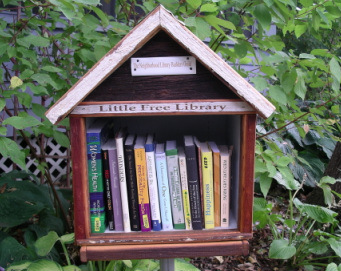
I’ve known about Little Free Libraries for awhile now, and since I learned about them I wanted to help establish one at our school.  I was waiting for just the right moment.  This summer I attended the Decatur Book Festival and saw several creative Little Free Libraries that were being auctioned off and it made me want to establish one even more.  I posted a picture of the libraries on our media center facebook page and immediately Ms. Cross, a 5th grade teacher, said she wanted to help make this happen at our school.  Her comment made me think about the gift that our 5th grade gives to the school at Moving On Ceremony at the end of each year as a way for the 5th graders to make their mark on the school before they leave.  Since our 5th graders won’t get the opportunity to go to school in our brand new building next year, I thought this year’s gift needed to be extra special.  I had found the perfect fit for the idea.

I began talking with people at our school about the project.  As always, our art teacher, Rita Foretich, was on board to help weave this project into an interdisciplinary experience.  Other teachers in the school that don’t even work with our 5th graders began offering ideas too and within a few days our spark of idea was really starting to grow.

I sat down with Mrs. Foretich and we did an initial brainstorming of what our project might look like.  We thought of materials, resources, locations, and also a sequence of events that would need to happen in order for the project to be done by the end of the year.  Our plan consisted of:  an intro to Little Free Libraries for the whole 5th grade, persuasive writing in 5th grade classroom, continued research and conversation in the media center, and little free library designs and artwork in art.  I took our plan to the 5th grade team for feedback and additions.  The teachers brainstormed ways for the students to really take ownership of the project such as donating their own books to stock the libraries and bringing in $1 each to cover the registration for the 2 libraries.

We launched into the first phase right after this session.  I made a short introduction video using screencast-o-matic and uploaded it to Youtube.  Mrs. Foretich showed the video at the beginning of an art class.

As she showed it, the kids immediately began having ideas and wanting to contribute them.  She developed a Google form to share with the students so that they could all submit their feedback without taking up too much of the class time to hold a discussion.  Mrs. Foretich’s student teacher also began contributing her knowledge and connections to UGA.

The next step will be for the student to brainstorm more about the materials, labor, and location so that they can begin writing persuasive letters to individuals and organizations for support.

Our goal is to create 2 Little Free Libraries by the end of the year.  One will be installed at the new Barrow and one will be installed somewhere near downtown so it is accessible to our students and the community on that end of town.  Who knows what this project will develop into, but it is already full of participatory culture as more and more people contribute their ideas, their expertise, and their creativity.

If you have ideas or resources for this project, feel free to leave them in the comments or contact our library.