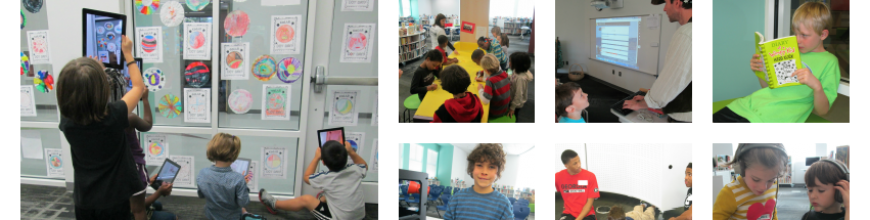
Goal 4: Supporting the Reading Habits and Curiosities of Students with Wandoo Reader

Wandoo Reader Kickoff (18)

Lindsey Hill, educator superstar from Evanced Solutions, visited our library to help us with goal 4 for the library this year, “Supporting the reading habits and curiosities”.  In fact, this goal is so important that it is a part of our school improvement plan.  We believe that one of the best ways to become better readers is to read, read, read.  More importantly, we believe that finding books that we are interested in that match us as readers is an essential part of building stamina as a reader.  This year we are piloting a tool called Wandoo Reader to see how it supports us in tracking our reading habits and curiosities.  This tool is still in development for schools so we are figuring out what works well and what needs to be adjusted.

Wandoo Reader Kickoff (2)


Wandoo reader is a “game and a reading tracker”.  It follows the story line of a robot who stumbles into a library but is low on power.  In order for the robot to power up, the robot needs kids to read books.  Students read books or really anything of their choosing.  In the online reading log, students submit the reading material title, amount of time read, and whether or not they finished reading the material.  Each time they log reading, they earn credits which allows them to purchase parts to the robot.  There are over 8,000 combinations of parts, so it’s pretty difficult for students to ever be truly “finished”.  Wandoo Reader also allows the administrator to setup incentives or prizes as well as secret codes for completing various challenges.

Our goal for Lindsey’s visit (and next week) was to get all of our 3rd-5th graders setup with accounts in Wandoo Reader.  Lindsey and I met with many classes.  I kicked off each session by sharing the news with students that we are the only school in the world currently using Wandoo Reader.  I wanted to emphasize the potential in this.  I brought in a conversation about empowering student voice in this opening (goal 3 for this year).  Students have an opportunity to test out a tool, figure out what they love, get frustrated with what doesn’t work, and point out what they just don’t like.  Each observation or failure that they make goes directly to Evanced Solutions for consideration in improving Wandoo Reader for future schools, so our student voice really matters and makes a difference.

Lindsey did a demo of what Wandoo Reader would look like once students registered.  She show them how to log their minutes, how to earn credits, and how to purchase a robot part.

Wandoo Reader Kickoff (11) Wandoo Reader Kickoff (12)

Then, we started the long process of getting students registered.  It didn’t take us long to discover that this process is not quite ready for schools and will need some adjustment.  Each student had to create a username, password, confirm password, and select the difficulty level for the game.  Then, students had to type my email address to send an email confirmation.  Each email had to be clicked on to activate each student account before they could proceed.  Bulk uploading is already in development and it is essential for schools to have this feature because the wait time students felt while I clicked on each email was too long.

Wandoo Reader Kickoff (20) Wandoo Reader Kickoff (25)

Once students have accounts activated, Wandoo Reader takes them through a tutorial which reveals the story line of the game and shows students the different buttons they will click to log reading, purchase parts, build a robot, etc.  This tutorial is text-only for now.  Some students read every word, others clicked through without reading at all, and others really tried to read but got frustrated without the support of audio or an adult’s help.  Again, this was an area where students and teachers offered feedback about their experience and observations and would really love to see an audio feature or simpler text.

Wandoo Reader Kickoff (8)

After the tutorial, students come to another screen where they have to put in their name, birthday, zip code, gender, and select their teacher.  There was a lot of learning here for students because it revealed that most students had no idea what a zip code is.  It was a great lesson, but it did slow down the registration process.  Our suggestion for this page was to cut out much of this page.  The essential information is the student name and the teacher.  These are the two pieces that will be used the most when running reports for data from Wandoo Reader.

Wandoo Reader Kickoff (16)

Once students made it through registration, the fun began.  Students practiced logging some books that were recently read, earned points, and started building robots.  Every student logged “Wandoo Reader” as a book if they read the tutorial.  There were smiles all around as each robot looked a little bit different than the next.  I loved how this feature gives students a sense of personalization, which is so important to students.  Once kids got into the program, we heard things like:

and

Students were really engaging in goal 1 from the library this year, “dreaming, tinkering, creating, and sharing”.  Of course, some students started testing the system to see how many points they could earn for more parts.  We can always clear that out through the administration portal, but they had permission to tinker.  They figured out how things worked, how things didn’t work, and also revealed to us what Wandoo Reader might need in order to focus kids on the true goal of the tool which is increasing student reading ability.

Wandoo Reader Kickoff (14)

Students were so proud of their robots

Wandoo Reader Kickoff (24)

We closed our time by talking about the importance of the data that Wandoo Reader will produce for our school.  I gave specific examples.  For example, if I see that a student clicks “still reading” on multiple books and never clicks “finished reading”, it might reveal to me that the student isn’t finding a good match for reading.  If a student reads the exact same book over and over, it might reveal to me that I need to have a conversation with that student to find similar books to the trusted favorite.  If I notice that several students are reading a lot in a particular genre, it might reveal to me that I need to purchase more of that genre for our library collection.  The list could go on and on because the data that Wandoo Reader can produce for me as the librarian as well as for classroom and collaborating teachers is something we have never had access to in a single location shared across the school.  If kids use it with “fidelity” as our superintendent says, then we can start to notice and really pay attention to the amount of time that our students are spending reading.  If we want to close the achievement gaps in reading, then one of the most important steps is getting the right books in kids’ hands and giving them time to read and have fun with that reading.  Wandoo Reader has great potential for this.

Wandoo Reader Kickoff (19)

Ms. Spurgeon record feedback for Evanced while supporting a student

Looking back over the day, there were many frustrating moments in the registration process.  In fact, there were times that it was that level of frustration where you just want to say “no thanks” and move on.  For students, there were moments where meltdowns, shut downs, and giving up could have happened.  However, the thing that sticks out to me most about the day is that there weren’t any tears.  Not a single student gave up.  I won’t pretend that they didn’t get frustrated because they did.  However, it is more important to me to see what they did with that frustration and it makes me ask “why?”.  Why didn’t they crawl under tables, cry, close their computer screens, or say I don’t like this?

I can’t prove why at the moment, but I can’t help but wonder about the library goals for this year.  We began each session by giving students permission to tinker and fail (goal 1 dream, tinker, create, and share).  We established a sense of purpose by helping them realize that their failure and feedback was contributing to the greater good of the world (Goal 2 global thinking & collaboration).  We empowered them to notice what wasn’t working as well as what they loved and share that into Lindsey’s recorder to take back to the developers (Goals 3 empowering student voice).  We talked about reading multiple kinds of text and logging everything and even gave them permission to log Wandoo Reader as a book (Goals 4 supporting reading habits).

Wandoo Reader Kickoff (15) Wandoo Reader Kickoff (21)

When I started the day, I really didn’t plan for every library goal to be evident in this one lesson.  As we moved through the first session, it became very clear to me that I needed to be transparent with students about the multiple layers of why we were using Wandoo Reader.  When I did that, the library goals naturally came to life because they are a part of my thinking every day.  If I can continue to replicate experiences like today, I feel like our students will continue to develop perseverance and stamina as well as feel like their voice matters in our school as well as the world.

Now the students who are setup are ready to start logging everything they read and building robots.  I told them to not worry about what they have read in the past but instead start with what they are reading right now.  Many will probably log minutes this weekend by visiting our Symbaloo page where we keep all of our resources.  Others will start logging minutes at school next week.  Regardless, the task now is to continue to tinker for a bit until we all figure out the best process for having kids log their minutes.  I will also follow up with teachers to see how they are feeling about Wandoo Reader and see what our next steps really are.

bar   CCSD Start Page

Even with the frustrations of registration, I feel like we all gained so much from this day to support us throughout this school year.  Thank you Evanced for this opportunity, and we can’t wait to see the changes to Wandoo Reader based on what was learned from these first student users.

Library Orientation: Starting the Year with Failure

QR orientation (6)

Last year, I decided to try something new for my library orientation.  Rather than have students sit and listen to me go on and on about how the library works, I let them explore the library with QR codes.  I loved this change so much that I decided to try this again this year and add some new twists.

First, I thought about all of the main questions that pop up during the year about using the library and made a list.  Then, I took this list and tried to make videos that were concise and addressed one task rather than weaving in multiple topics into one video.  This included topics such as how to search in Destiny, how to check out with and without a student id, how to check in, how to use a shelf marker, how to place a hold, and where supplies are located.  I also had some pieces of the library that I wanted students to know about such as areas where participatory opportunities would be displayed and what was new in our makerspace.

I took each video, improved the sound quality in iMovie, and uploaded to Youtube.  Using Kaywa QR Code generator, I made a QR code to each video, labeled it, printed it, and put it in a sleeve to hang in the library.

When 2nd-5th grade came to the library, they entered to a rolling slideshow of our 4 library goals.

1dream

2global

3empower

4reading

I wanted our first focus to be what we hope our library is about this year.  The procedures are important because they affect the flow of the year, but the goals are what drive us every day.

After talking about the 4 goals, I showed students how the orientation would work.  Each student would have an iPad with headphones.  Using the Layar app, students would scan each QR code and tap on the video to begin listening.  There were 4 videos that I wanted every student to review:  how to check out, how to check in, how to use Destiny, and a tour of the library sections.  I placed these 4 codes on 4 tables so that students could easily keep track of which videos they needed to watch first.  Following the 4 videos, students could scan a QR code on the project board that took them to a playlist so that they could choose any of the other videos to watch.

QR orientation (5)QR orientation (8)Once students scanned a video, I encouraged them to carry their iPad and go to that section of the library so that they could physically see the things that I was talking about in the video.  Once again, this was a wonderful experience because it allowed students to move, replay videos if needed, and actually see the library spaces rather than sit and listen.

QR orientation (4) QR orientation (2)

This worked beautifully some of the time, but here’s where the failure comes in.  On the 2nd week of school, our district implemented a new filter.  Filters can be wonderful things to protect our students, but anytime something new is implemented the bugs have to be worked out.  On day 1, every Youtube video was blocked on the iPads.  As soon as students started scanning, they got the no access screen.  Luckily, I could still access Youtube on my own computer so I decided we could just watch some of the videos on the projector.  Then, the internet speed became so slow that no videos would work.  Finally, we just got in a line and did an old-fashioned tour around the library.  The coolness of the QR codes was gone, but we still accomplished learning about the library.

While this experience was very frustrating, it allowed me to model what it means to not give up, to persevere through failures, and to expect that great things will happen even when things don’t work.  Rather than bottle all of my thinking in my head, I began to share it with the kids.  I said things like, “This was an epic failure, so let me back up and rethink this” and “Why don’t we try…”.  In future lessons, I built this conversation into our mini-lesson.  I prepped the kids by sharing the failures we had already encountered and how we worked through them together.  What I started to see was kids who were being more patient and were trying different strategies when the internet was slow or a code didn’t scan rather than kids who were giving up or kids who were yelling out about something not working and asking for an adult’s help.  I was reminded of the importance of sharing that it’s ok to fail as long as you use that failure to learn what you might do differently.

QR orientation (3)

In Kindergarten and 1st grade, we used the book Awesome Dawson by Chris Gall.  I chose this book because Dawson is a “maker”.  I felt like he embodied what I hoped that all of us would consider ourselves across the course of the year.  During our reading of this book, we paused to notice how Dawson never gave up.  We pointed out his epic failures along the way and how he took those failures, backed up, and tried something new.  He never lost his cool.  Instead, he took a different path or split a huge invention into 3 smaller ones.  As we made these noticings, we made connections to our own learning and the goals that we had for this year in the library.

QR orientation (1)

Following our read aloud and/or QR code tour, we used Kahoot to review a few of the library procedures.  I chose Kahoot for a few reasons.  One was to put it in front of teachers at the very beginning of the year as an engaging tool to use with students to check for understanding.  Several teachers were eager to try it in their classrooms.  Another reason was to make the really boring topic of library procedures fun and get us all on the same page.  It worked.  Even another reason was to throw a tool at students that was new to just about all of them and once again practice our acceptance of failure.  Several students couldn’t login.  Others had games that didn’t load as fast as other i Pads.  Still others got kicked out in the middle of the game and had to log back in.  Did any of these failures stop of us from learning? No.  We used each and every barrier, glitch, and student error as a learning tool for how we will work together this year.

Now that our orientations are over. We are ready for a year of miraculous projects.  The QR codes are now hanging all over the library for students to continue to reference throughout the year as they forget how to check out or place a hold.  The videos are also being sent to all of the library volunteers so that they can also review the different ways the library works before assisting students and shelving books.

I’m sure I will make even more changes to next year’s orientation, but I love how this one set the stage for our year.


Using Skype in the Classroom to Connect with Rube Goldberg’s Granddaughter

jennifer george (4)Second grade has been studying force and motion as a part of their science standards.  We kicked off this unit in the library by learning about the inventions of Rube Goldberg and exploring the Rube Works app for iPad.

In class, students explored force and motion through a Picture Perfect Science lesson about roller coasters.  During this exploration, they learned key vocabulary and concepts for force and motion.  After exploring, they learned even more about force and motion through informational text.  Finally, students worked in collaborative groups to build their own Rube Goldberg invention.  During this process, students were able to apply many of the concepts and vocabulary that they learned through the other experiences.  I loved peering into their classrooms from time to time to watch them try to get their inventions to work.  I loved how they tried something, failed, and then tried again.  This is something we’ve had a lot of conversations about.

Today, thanks to Skype in the Classroom, students had the chance to Skype with Rube Goldberg’s granddaughter, Jennifer George.  If you haven’t taken a look at Skype in the Classroom, you should!  Teachers and guest speakers can post topics or lessons and classrooms can sign up to participate in those lessons.  Once you sign up, you go through a process of communicating with the creator of the lesson or topics in order to schedule your Skype connection.  Also, educators get a free Skype premium account for signing up.

Rube Goldberg   Skype in the classroom

Our connection lasted from about 40 minutes.  During our time, Jennifer George shared some Rube Goldberg facts that only a granddaughter would know.  For example:

  • he wore shoes when he went swimming
  • he was always on time
  • he ate whip cream for dessert and when cool whip came out he ate it by the bowl
  • when he got his 1st car, there were only 12 cars in New York City

She talked about how Rube Goldberg never built the inventions that he drew, but many people have taken his drawings and built the machines or designed their own.  I loved how this fact fit in with our collaborative project and how each member of the team brings something different.

jennifer george (6)

We also loved meeting Jennifer’s cat.  The students couldn’t contain their excitement when the cat jumped up behind her on the counter.  Jennifer gave us a close up view of him.

jennifer george (12)

After Jennifer gave us some facts, she spent some time letting students ask questions.  They love to do this.  I loved how she listened to each student’s name and repeated it in her response.  It made the conversation connected and personal.

It was during these questions that we learned things like:

  • Rube Goldberg created over 50,000 cartoons
  • He started drawing when he was about the age of our 2nd graders
  • Jennifer is a fashion designer who has designed clothing for several big celebrities like Madonna and Aretha Franklin

The students really wanted to see some of Rube Goldberg’s drawings, but thankfully thankfully many of them are available in a new book called The Art of Rube Goldberg.  I think that students are going to be demanding that we get this book in our library.  Thank you Jennifer George for sharing the stories and inventions of your grandfather with us.   Thanks Skype in the Classroom for this fun time.  

You can learn more about Rube Goldberg at http://www.rubegoldberg.com/

jennifer george (10)

We have another Skype in the Classroom connection coming up soon with David Fox, developer of the Rube Works app that we have been playing.  We can’t wait!

Kinetic Art Sculptures Using Our Makerbot Replicator 2

kinetic sculpturesOur art teacher, art student teacher, and I have been having a blast with 3rd graders designing kinetic sculptures.  About 2 weeks ago, students came to the library during art to learn about Tinkercad and how artists use technology to create.  Before this lesson, they watched a Tinkercad tutorial.  In small groups, they designed an object for 3D printing.  Whatever they designed would become one piece of a larger kinetic sculpture in art.  You can read more about that experience here.  

kinetic sculptures (15)

Once students finished their design, I went into each account and tried to double check that the designs were all pushed together into one piece art.  Then, I downloaded the .stl file into Makerware.  In Makerware, I resized the object to a smaller size to speed up the printing process.  I also added a raft (removeable base) and supports to each print.  I’ve found that in Tinkercad these 2 steps are needed because what you see on the computer screen might actually be misleading.  The raft and supports help the 3D print be more stable.  All files were loaded onto the SD card prior to students arriving.

kinetic sculptures (9)

Ms. Foretich, art teacher, created a printing schedule with about 60-90 minutes between prints.  During each time frame, students came to the library and chose their filament color.  Then, I shared some information about the 3D printer since it was the 1st 3D print for most students.  Finally, we pulled up the file on the SD card and a student pressed the M.  Students sat in chairs or huddled around the printer to watch.  After watching the print for a few minutes, students went back to their regular day while the print finished.  I kept an eye on each print during and between my lessons.

kinetic sculptures (13)

Each printing experience was different and you really never know what is going to happen when you press that red M.  Many times the print is a big success, but sometimes it’s not.  We’ve had some failures, which are very important.  We save every failed print we have and put it in a box.  It reminds us that we aren’t perfect, but it also serves as an instructional tool to talk to students about what didn’t work.  We learn from our failures and a box full of failure speaks volumes to all of the students who are starting their 3D printing process.

fail

When a print fails, we go back into the design and look at what needs to happen.  Sometimes it’s as simple as pushing some pieces together more than they were.  However, sometimes it’s a big flaw that cause students to just start over.  It certainly slows the process down, but it is important for them to revisit their work, revise, and try again.

kinetic sculptures (7)

It’s always fun to see which students are motivated by the concept of 3D printing.  Sometimes the students make surprising choices like giving up their recess time to spend that time watching the 3D printer create.  Hearing their “wows” and “cools” is inspiring.

jaymar

Students are continuing to print their pieces this week and next.  In the meantime, they are continuing to work on their kinetic sculptures in art knowing that their 3D printed object will also be a part of their design.


A Flipgrid Celebration with 2nd Grade and the Flipgrid Team

Flipgrid Skype (1)

Our 2nd graders just wrapped up a huge research project.  During the project, they chose a leader from black history, researched that person, wrote a short persuasive piece about their person, designed a US postage stamp, and recorded a video using Flipgrid.  Their videos were pulled together on a Smore which included a Google Form for people to vote on their favorite leader from black history to be featured on a postage stamp.   Read more about our project:

Post 1

Post 2

Along the way, the students had several connections to an authentic audience.  They started the voting portion of the project by sharing at our schoolwide assembly.  Students stood in front of the entire school and told about the project as well as shared a video from each question of the grid.  The Smore was emailed to every teacher and student in the school.

I also shared the Smore on Twitter and our library Facebook page.

facebook post


Shawna Ford, librarian in Weatherford Texas, saw my tweet and had her 2nd grade students view the project.

Shawn Ford Students


As the project continued, my posts and tweets were shared and retweeted until our Smore had 480 views and counting.

smore hits

Our project was viewed in 161 locations and counting.

Smore Map


Throughout the project, Charles Miller and Bradford Hosack, our friends at Flipgrid, were following along and sharing our work as well.  It has been an incredible experience for students to use a tool, encounter success and frustrations, and be able to offer feedback to developers that respond to that feedback.  The Flipgrid team has been so responsive to all of the feedback we have provided to them, and they consistently work on Flipgrid to make it better.

Flipgrid Skype (9)

Today, our 2nd graders came together in the library to connect with the Flipgrid team via Skype.  The team shared information about how Flipgrid was developed and talked to the kids about coding.  All of the 2nd graders had background in this concept because they all participated in the Hour of Code back in December.  I loved how the Flipgrid team reiterated what I had told the students many times.  You have to work through the frustration.  You have to be willing to fail and learn from your failures to make things better.  The team said more than one time that they wanted to create a tool that works for users, so they are constantly listening to users of Flipgrid to improve their product.  I hope that the students carry these ideas into all area of their lives to be willing to take risks and work hard at what they are passionate about.

Flipgrid Skype (3)

Charles and the Flipgrid team then gave us some stats about our videos.

  • 1875 people watched the student videos
  • 699 people clicked on the heart to like videos that the students made
  • students created 1 hr 15 minutes of video all together

During this presentation of facts, Charles reminded students that when they make a project like this and share it with the world it really is giving them a global voice.  I loved that he said this because it is something we strive for in our library:  giving students a global voice.

One of my favorite parts of our Skype was the awards.  We wanted to honor several students during this segment.  Because each video was “liked” by viewers of the video, I could easily see which videos had the most likes.  This became an award category.  We also had specific students who received shout-outs on Twitter because people watched the videos and cared enough to specifically name a student video that they loved.  Finally, we had some students who worked really hard to express themselves in their writing and persuade people to vote.  I created a certificate to use.

certificate


After selecting all of the students, I sent a list of the awards to the Flipgrid team and they announced the winners via Skype.  It felt like the Academy Awards as the Flipgrid team cheered for students as I handed out the certificates, and it was amazing to hear the shouts and claps of all of the 2nd graders cheering on their peers.

Flipgrid Skype (8) Flipgrid Skype (6)


Mixed in with our connection the kids had a chance to ask the Flipgrid team questions.  I loved the moments where one student said “sometimes it doesn’t work” and another student said “I think you need to be able to turn up the volume for people who talk soft”.  These weren’t questions, but the Flipgrid team let the students know that because of their videos they were already thinking about volume and that they were working to make sure Flipgrid always worked for users.

During and after our Skype, the Flipgrid team and I shared several pictures from both sides of the Skype: Georgia & Minnesota.

We closed our time together by revealing the results of the overall voting for the favorite leader from black history to be on a postage stamp.  The votes were extremely close, but Rosa Parks came in just 1 vote ahead of Jesse Owens.  By this point, the kids were so excited about all that had happened with their project that the vote didn’t even seem to matter anymore.

Thank you to Charles Miller, Bradford Hosack, and the entire Flipgrid team for helping us celebrate this project today before we move on to our next adventures in the library.  Thank you!


Expecting the Miraculous Now and in the New Year

photo (4)Over the summer of 2013, I was fortunate enough to receive an advance reader copy of Flora & Ulysses:  The Illuminated Adventures by Kate DiCamillo.  She is by far one of favorite authors because her words always seem to speak to me in some way beyond just the story.  On p. 130, I came across a quote that I have honestly carried with me in my heart and mind since reading it.  In fact, it has become a motto that I embrace in our school library because it exemplifies the brand that our library represents.

“All things are possible,” said Dr. Meescham.  “When I was a girl in Blundermeecen, the miraculous happened every day.  Or every third day.  Actually, sometimes it did not happen at all, even on the third day.  But still, we expected it.  You see what I’m saying?  Even when it didn’t happen, we were expecting it.  We knew the miraculous would come.” ~Kate DiCamillo

Expect the miraculous.  It’s the phrase that I cheezily say to myself as I enter school each day.  It’s what I remind myself of when I sit down to plan with teachers.  It’s what I whisper to myself in the midst of a technology fail.  It’s what came out of my mouth in a recent interview with School Library Journal:

For wary school librarians, Plemmons adds, “My philosophy is, if we don’t expect miraculous things to happen in our libraries, then we’re just limiting ourselves. Why totally shut a door when we don’t know where it leads to?”

I don’t want to put limits on what kids are allowed to do just because I might not be an expert in a particular tool or concept.  I’m willing to try anything new with any age of students and expect that something great will happen even if it’s not what I imagined happening in my head.  In Invent to Learn, Sylvia Martinez and Gary Stager say,

“It is unacceptable and unnecessary to deny children the opportunity to work on something they are passionate about because the teacher is not an expert in that particular field.”

Looking back through my posts of 2013, I see so many incredible things that happened in our library because we (myself, students, teachers, families, connected educators, and special guests) expected the miraculous.  Here are just a few:

  • 5th graders working together to design, plan, persuade, collect, paint, and dedicate during the Little Free Library project.  We now have 2 Little Free Libraries thanks to their hard work.  We went into the project with so many unknowns, but we always expected that the libraries would exist in our community.  Check out the posts!
  • 2nd graders developing their writing skills through blogging and connecting with students in Van Meter, Iowa.  This project included a miraculous connection with author/illustrator Jenny Sue Kostecki-Shaw.  Check out the posts!  Post 1  Post 2   Post 3

  • 3rd graders engaging in action research to solve a real-world problem at our school.  Their investigations included webcam observations, indoor and outdoor observation, skyping with Cornell University and a former Barrow Buddy via Skype, and email communication with other experts.  Their work resulted in many attempts at saving birds from crashing into our school windows.  Post 1  Post 2
  • 1st graders using Twitter to write persuasive messages about our environment.  Check out the post!
  • Multiple connections for special events like World Read Aloud Day, World Book Night, Dia de los Ninos, Read for the Record, and Talk Like a Pirate Day.
  • Students purchasing books for our library with their very own student book budgets.  Check out the post!

  • Students from throughout the school crowd-sourcing a poem using Google Forms for Poem In Your Pocket Day.  Check out the post!
  • Our annual Poem In Your Pocket Days live on Adobe Connect with viewers in multiple states and countries.  Post 1   Post 2
  • Kindergarten students becoming experts inTux Paint and making an informational video to teach others to use the program.  They even connected with students in Van Meter, Iowa to share their expertise.  Post 1  Post 2

  • Moving into a brand new library and working together to learn how to use it.  Check out the post!
  • The entire 4th grade working together in the library over several days to research explorers and Native Americans as well as challenge their thinking about heroes and villains.  Check out the post!
  • 2nd graders using Thinglink to publish monster stories.  Check out the post!
  • A Picture Book Month Smackdown with 2 authors and schools in 5 different states.  Check out the post!

  • After our district decided not to buy a 3D printer, we continued expecting the miraculous.  Miraculously, Donors Choose and Makerbot created a partnership and overnight a 3D printer was funded for our library!  Check out the post!
  • Classes in every grade level committed to exploring computer programming during the Hour of Code.  I’m expecting more miraculous things to come out of this one hour experience.  Post 1  Post 2
  • Our very first student-made design was printed on our 3D printer.  Grant and I expected the miraculous (even though we were prepared for failure).  Check out the post!

1st print (18)

When we give kids the space to explore, the tools to create, the connections to expertise and collaboration, and a global audience to share with, miraculous things will happen.  I know that not everyone believes this.  Recently, an article was published in the Athens Banner Herald highlighting out Hour of Code activities.  In the article, I was quoted saying:

“I encourage them to think about how coders aren’t afraid to make mistakes,” Plemmons said. And when they do make a mistake, they work with their peers to fix it.

Even though I try to avoid reading online comments (and I wish I had used the word failure instead of mistake), I was disturbed by one commenter’s post.  She said:

Such a lax attitude is not acceptable in my book. I am afraid to make mistakes in my work so I make sure all possibilities are considered and all details are addressed and included. I also make great effort to anticipate any questions my clients may have and am ready with an answer before I sit down at a meeting. I don’t need to ask others to help me fix any problems; I’ve already fixed them.

It’s good to tell kids to relax and not worry about making a mistake as they learn, but that real work for hire must be near perfect without wasting a lot of people’s time or your own.

The most disturbing part of this comment to me was the notion that giving kids space to fail, step back, re-evaluate, and try again is having a lax attitude.  Many major companies encourage their employees to fail early and fail often. This allows their employees the freedom to be innovative and take risks knowing that those risks are what unveil the latest great ideas. By failing early, learning from failure, and fine tuning their products, companies are able to release the best quality product that they can. In the digital world, companies continue to listen to the consumer and push out updates to improve any mistakes or ideas that they missed. This is the same kind of situation with students. They aren’t publishing final products online that are full of mistakes. Rather, they are attempting to make the computer do what they want it to do, trying some code, seeing what works and what doesn’t, and fine tuning their work. No one sits down and makes a perfect product without first failing.  Expecting the miraculous certainly doesn’t mean that you are expecting things to be perfect on the first try.

I was reminded of the importance of failure when I was recently reading Presentation Zen by Garr Reynolds.  Reynolds says:

“The fear of making a mistake, risking an error, or being told you are wrong is constantly with us. And that’s a shame. Making mistakes is not the same thing as being creative, but if you are not willing to make mistakes, then it is impossible to be truly creative. If your state of mind is coming from a place of fear and risk avoidance, then you will always settle for the safe solutions–the solutions already applied many times before.”

“Children are naturally creative, playful, and experimental. If you ask me, we were the most human when we were young kids. We worked on our art, sometimes for hours without a break, because it was in us, although we didn’t intellectualize it. As we got older, fears crept in along with doubts, self censoring, and overthinking.”

In 2014, I am going to continue expecting the miraculous with my students, my collaborators, my families, and my peers.  We will embrace our failures, learn from them, and continue to create innovative work together.

I am going to start 2014 by asking my students, “What miraculous things do you expect in 2014?”  They will record their responses on a Flipgrid.  I invite you to add your own expectations to the same Flipgrid.  Go ahead.  Give it a try.  Expect the miraculous.

Day 2 (3)