Exploring Makerspace through Alternative Recess

makerspace recess (7)Since the beginning of the year, students have been itching to get into our library makerspace to use the many tools housed there.  As the librarian, I try to weave as many of these maker tools into curriculum as I can, but the truth is that it’s just not fast enough for our students.  Telling them, “I’m waiting to find the right piece of the curriculum to use the littlebits with”, is not acceptable.  They want to tinker and explore and see how things work.

makerspace recess (6)

Recognizing this, I had to find a way to give them more access.  I can’t say that I’ve found the perfect solution, but I’m working on it.  I’m blessed to have the University of Georgia right next to our school.  I’m even more blessed that the College of Education is within walking distance and Gretchen Thomas teaches in the instructional technology department.  Gretchen is an educator who truly gets the realities and challenges of school.  She wants her students to have experiences with what instructional technology really looks like in a school rather than guess about it in the college setting.  She and I have been brainstorming about challenges that I face in the library and the makerspace has come up a lot in our conversations.  We’re trying to create a plan to have adult support in the makerspace on a regular basis for students to explore during their recess time.  This alternative to going outside isn’t the only solution, but it’s one that many of our students are willing to do in order to get their hands on the makerspace tools.

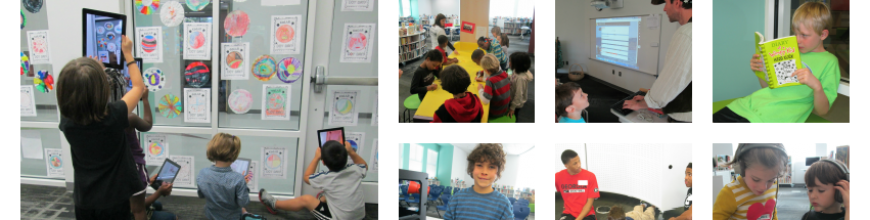
Even though we don’t have details worked out for Gretchen’s students to be in the makerspace, she has volunteered her own time once per week to come in and help.  For the past 3 weeks, we have offered makerspace recess to our 4th graders.  A whole range of students have shown up.  I was very excited to see such a mix of boys and girls as well as several other kinds of diversity within the group as well.

makerspace recess (5) makerspace recess (8)

During the 1st recess, Gretchen and I quickly showed the tools in the space: Sphero, littlebits, and MaKey MaKey.  Students chose a starting place and jumped in.  It didn’t take long until the Sphero was being driven around the library, being programmed to drive and jump over a ramp of books, and a maze of books, shoes, and legs was being created on the floor.

makerspace recess (4)

Students used the littlebits cards to snap together several suggested circuits, but it didn’t take long for students to start snapping random bits together to see what would happen.

makerspace recess (9)

Students at the MaKey MaKey got out balls of Playdoh and started plugging in alligator clips.  Gretchen showed them how they could type using the balls of Playdoh, and they also explored how to play the piano on the MaKey MaKey site.

This alternative recess is certainly supporting my library goal of allowing students to dream, tinker, create, and share.  This free time to dream and tinker will only strengthen the curriculum work we do within the makerspace in grade level projects.

At some point, I’m sure we’ll create some structure to our alternative recess, but for now it just seems right to explore.

Maker Maniacs Enrichment Cluster Update: 3D Printing and Robotics

blokify (5)We are a little over halfway done with our enrichment clusters this year.  Every Friday, students across the school go to an interest-based cluster of their choosing for one hour.  During this time, students explore a topic and develop products or services related to their topic.  My cluster is called Makerspace Maniacs.  So far this year, we have explored making with duct tape, building with cardboard, lego robotics, and 3D printing.  After lots of explorations, students  are making decisions about where they want to focus.

A small group of students is focused on lego robotics.  Monica and Omarion are both committed to building a robot and programming it.  They both have varying levels of expertise.  Today, I asked another student, Ludwig, to come and work with them.  Ludwig has a lot of experience with Lego Mindstorms.  During clusters today, he worked with them to build a robot and program it.  Although they didn’t get far with the programming, he was able to show the students some tips and tricks to get the robots to work the way they wanted to.  I love using students as experts.  They hold so much knowledge that we don’t even know about.  Ludwig just happened to talk to me one day about Lego Mindstorms because he knew that I bought some.  He used Lego WeDo and Lego Mindstorms in other settings and told me he was willing to help me any way he could with them.  How exciting that a student offered his expertise without even being asked!

Other students in the cluster have decided to work on 3D printing.  Over the past 2 weeks, they have used a new iPad app called Blokify.  This app uses blocks to build a 3D object.  It is very user-friendly to build a 3D object in very little time.  Once built, the object can be ordered or emailed for 3D printing on your own device.  Today, students really focused on coming up with an idea and using the blocks to build.  While they were using the app, I started a Google Doc, which I will share with them, to collect what we love, wonder, and want to change about the app.  One service they will offer as a part of the cluster is to share this info with Blokify.


Today, we were also tweeting with Blokify and students were able to respond to their tweets.  Such fun!

Twitter   blokify   plemmonsa What they like most ...

Students prepared several files that they emailed to me.  I have them ready to go for 3D printing next week.  We’ll be printing a pirate ship, a Trojan pig, and a castle among other things.  As we progress, these students will also think about how they see this app fitting into what they are already doing in class.  We’ll come up with some lesson ideas for teachers to consider.

We only have a few weeks to go, but our speed is picking up and our focus is narrowed.  I know incredible things are going to happen with these students.

Makerspace Maniacs Enrichment Cluster

first robots (10)For about 4 weeks, a group of 2nd-5th graders have been meeting with me on Fridays from 8:15-9:15AM.  This time is called enrichment clusters at our school which basically means that kids select a group based on their interest and spend a period of time learning and creating around that topic.  Our cluster is called Makerspace Maniacs.  Our first sessions have been about exploring the world of making.

first robots (3)

So far we have:

  • Watched Caine’s Arcade and explored the idea of making interactive creations with cardboard.

  • Watched Sylvia Super Awesome Maker Show and explored how we can take our creations and create instructional videos about them.

  • Watched Landfill Harmonic and explored how makers take other people’s trash or unwanted items and turn them into functional creations.

  • Watched how a 3D printer works and imagined what we would create on it.

  • Tinkered with Lego robotics and programming.
  • Explored making things out of duct tape.

Now, students are beginning to think about what they are interested in spending more time with.  Right now, we have a lot of interest in robotics.  Today, one student spent time exploring the directions to build a mindstorm NXT robot and began the building process.  Another group of students looked at the Lego WeDo kit and followed instructions to build an alligator.  Other students spent time, exploring how the various lego pieces fit together.  Since their interests are so drawn to robotics, Christa Deissler from UGA will be helping me coordinate a guest speaker to talk to students and demonstrate programming of robots.

first robots (9)Seeing something tangible really inspires the students.  Today a student figured out how to use the WeDo software to make the alligator open and close its mouth.  When students saw this happen, they immediately wanted their creations to do something too.  Once we get past the exploration stage, I think students are going to want to get into the workings of the programming software and figure things out.

In other news, our Donors Choose project to get a 3D printer is fully funded!  This will give these students access to even more tools for making.  Two other classes already have ideas for how the printer might be used in their own projects.  Once it’s here, I’m sure that there will be lots of exploring, learning, and sharing between classes to figure out how this tool can support the learning in classrooms.

first robots (7) first robots (5) first robots (2) first robots (1)