The Power of Tinkering Before Assigning a Project

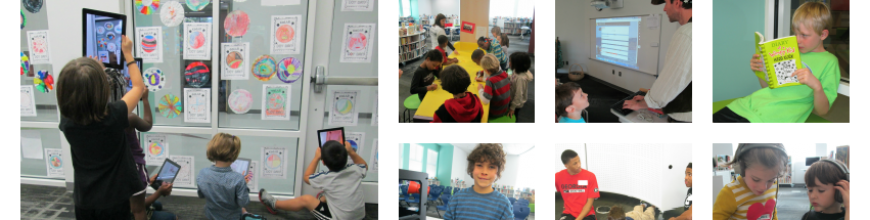
Educreations Day 2 (2)One of my library goals this year is to give students, teachers, and families opportunities to dream, tinker, create, and share.  That has meant many things during the course of this year, but one of the things that so many of our teachers are embracing with me is intentionally planning time for students to tinker with a new tool before we ask them to create a project with it.

Educreations Day 2 (6)

During collaborative meetings and virtual planning with teachers, I often ask if we can build in time for students to explore a technology tool with no limits, rules, or assignments.  The only assignment is to push as many buttons as you can and see what you can figure out about that tool.  In addition, there is an expectation that students will pass on their expertise to others as they figure something out through tinkering.

Educreations Day 2 (5)

There have been several instances of this type of tinkering happening this year.  Ms. Hocking gave her Kindergarten students time to tinker with storykit.  All of third grade tinkered with Puppet Pals before a folktale project.

This week, first grade is also taking time to tinker with the Puppet Pals app as they prepare for an opinion writing assignment in English Language Arts.

IMG_4796

Finally, 2nd grade is about to start creating math screencast tutorials using the Educreations app for iPad.

As I’ve facilitated these tinkering sessions, I’ve started to adjust how the sessions run.  We start on the floor to talk about tinkering.  Students share some knowledge about what they already know about tinkering.  Some of the responses I’ve heard are:  a time to explore, a time to be busy, and figuring things out.  I follow this with my own understanding of tinkering.  I establish two big ground rules: 1. Push every button you see in an app and see what it does.  2. Share what you learn.

In most classes, I breeze through the app with very little explanation of what I’m doing just so that students get a quick preview of what they will be looking at and what they might end up with.  In Educreations, I wrote 2+2=____ and then drew out a picture of how I solved that math problem.  I didn’t talk about clicking on colors, the microphone, or really anything.  I just wanted them to get a quick view of the end result.

Then, students had a large chunk of time to explore on the iPads.  For 2nd grade, we did this in pairs, but some classes have been individuals.  My role was to walk around and observe.  A few students were tempted to ask me how to do something, but I responded with a “give it a try”.  Very rarely did I do something for a student.  The only time I intervened was when students needed help getting the app up and running or if the iPad had a technical problem.

As I observed, I would stop and ask students questions like “What did you figure out?” or “Why did you choose to do that in that way?” or “Now that you’ve seen how that works, would you do it a different way next time?”.  These were common questions that I used again and again and they certainly were not ones that I started with.  I was very tempted at first to just jump in and show students something, but I learned to step back and ask questions that allowed students to show what they know.

I saw students naturally leaning over and helping other students, but during my observations, I sometimes saw an opportunity for 2 students to partner and share their learning.  This was another role for me to serve as a connector between students.

The energy level was high, and there was some frustration.  However, I did not see any student give up, get completely off task, or leave without learning something about  how the app worked.

At the closing of each lesson, we gathered back on the floor.  I connected an iPad to the projector and had students come and demo their learning for the rest to see.  We tried to move as quickly as possible to share as many tips as we could.  A big observation for me during this time was how attentive students were.  I’ve never seen students watch a peer presenter with such focus.  Usually, they are having side conversations or tuning out to think about other things.  This time they were watching, listening, and giving connection signals if they had also figured out that part of the app.  If time allowed, I had students turn to one another on the carpet and share even more that they had discovered.  During the closing, I tried to connect what students had discovered with the actual project that we would be implementing next.  For example, a student did a demo of how you can erase while you are recording and I added that this might be a tool you would use while modeling subtraction in a video.

Now that this time of tinkering has happened, our next step is to do the work.  First grade will use Puppet Pals to create opinion puppet shows and 2nd grade will create math tutorials to share.  I’m eager to see how productive students are now that they have had time to get familiar with the app before a curriculum standard expectation was placed on them.  My want to continue to explore the power of tinkering and how it can support the work that we are trying to achieve with students.


Keeping Project Momentum When the Schedule Gets in the Way: One Use of Google Hangouts

Barrow Peace Prize Criteria   Google Docs

Our 2nd grade is deep into their project on six people from Black History.  Most classes are finishing up their research for our Barrow Peace Prize Flipgrid project.  Before students begin the writing process, we want them to understand what the Nobel Peace Prize is and consider the character traits that someone might have who receives this award.  Every class needs the exact same lesson, but they need the lesson before students can really move forward with their writing.  Sometimes the library schedule can get in the way of these kinds of projects.  I don’t want the library schedule to cause a project to be delayed simply because we can’t fit everyone into 30 minute slots across a day or two.  This is the perfect time to use technology to maximize our time.

For the 2nd time, I did a Google hangout with an entire grade level in order to save time.  Before the hangout, I setup a Google Hangout on Air and sent the participation link to all of the teachers via email.  I also created a Google doc where we could do some brainstorming and invited all four of the 2nd grade teachers to be collaborators.  I made sure that the link to the doc was “view only” for anyone else with the link.

Before the hangout started, I opened the hangout, turned on my cam, and muted my microphone.  As the four classes joined, I could easily hear if their microphone and video was working or not.  Then, I could use the control room tool to mute each teacher’s microphone while we waited on all classes to join.  Periodically, I came back on the microphone to update the classes who were waiting and remind teachers to open our shared Google doc.

The purpose of the hangout was to help 2nd graders get familiar with Alfred Nobel and the Nobel Peace Prize as well as to develop a list of characteristics for our own Barrow Peace Prize.  After a quick intro, I read the book Alfred Nobel: The Man Behind the Peace Prize by Kathy-jo Wargin and illustrated by Zachary Pullen.  Then, I told the students just a bit about Malala Yousafzai, the youngest winner of the Nobel Peace Prize.  We watched just the beginning of a CNN video of her acceptance.

Then, I invited each class to look a the shared Google doc and brainstorm the qualities that we hoped would represent the Barrow Peace Prize.  I muted all microphones while classes discussed and added to the doc.  While that was happening, I shared the viewable link to the doc on Twitter so that an audience could watch the list be constructed.

We immediately had multiple viewers of our work in progress.

Each class had an opportunity to step the microphone and share just a bit of what they discussed.  I was in charge of calling on each classroom and muting and unmuting each teacher’s microphone.

Finally, I closed by reminding students to use their research as well as the character trait list when writing their piece about their person from Black History.

What would have taken 3-4 hours on the library calendar took only 30 minutes and now the 2nd grade can move forward with the writing process.  I want to check in with the 2nd grade teachers to see how things felt on the other side of the camera, but from my side, this seemed like a great model for whole grade lessons that lend themselves to a hangout.  I certainly wouldn’t want all lessons to be like this one, but this format felt right for this situation.

Black History Research Using Encyclopedia Britannica and the Google Research Tool

google doc research (9)

Our 2nd grade is once again developing a Black History research project.  We took some innovative steps last year to connect this project with an authentic audience around the globe.  This year, we are trying to add a few new layers.  One of the pieces that we weren’t happy with last year was the idea of a postage stamp.  Students were trying to persuade an audience to vote on whether or not a famous person from Black History should be on the next postage stamp.  While we loved the project, we knew that the postage stamp was out of our control and not realistic.  This year, we decided to create our own prize that we could award to one of the people from Black History, and we are calling it the Barrow Peace Prize.  As part of our project, we will learn about Alfred Nobel and the Nobel Peace Prize.  That part of the project will come soon.

google doc research (8) google doc research (7)

At the moment, we are deep in research.  Each teacher scheduled 2 hour-long sessions with me.  We decided to focus on 2 research tools in the library and 1 research tool in class.  In class, students will use PebbleGo.  It is the most familiar database to our teachers and students and a great tool for independent research.  We wanted the library research tools to be a bit more involved with the support of me, the classroom teacher, and any collaborating teachers.  The 2nd grade teachers developed a Google Doc graphic organizer with some framing questions.  There was a space for students to add their research as well as cite their source.  At the bottom of the organizer was a space for images.

Practice Barrow Peace Prize Research   Google Docs 2

Most teachers shared this doc with students through Google Classroom, but if they weren’t using Google Classroom, they shared via Drive and students made their own copy.  This step was done before coming in the library.

google doc research (7) google doc research (6) google doc research (5)

In the library, we started with Galileo, our state research databases, for session 1.  We focused specifically on Britannica Elementary.  I did a brief mini lesson for students on how to search for a person, how to read to find answers to questions, how to change the levels of the text, how to turn on text to speech, and how to cite a source.  Then, students had time to research with the support of peers and the teachers in the room.

Wilma Rudolph    Britannica School

During session 2, we focused on using the research tool in Google Docs.

Practice Barrow Peace Prize Research   Google Docs

I LOVE this tool, but I did feel like it was a step up for the trustworthiness of a database.  We had to add a layer of conversation about evaluating the sources we were using.  I showed students how to open the research tool under the tools menu.  Then, we practiced a search together.  I showed them how to look at images, quick facts, and specific websites.  They loved how you can do a preview of a website before you actually open it.  Finally, I showed them how the research tools makes citations so easy.  By simply dragging pictures into the doc, the images are cited.  By clicking on “cite” on a website, the website is added to the doc.  They loved the simplicity of this.

Again, students went to work answering their questions and citing sources.  The teachers and I had individual conferences to help students search for information, clarify terminology like “contributions” and “accomplishments”, and wordsmith with students to put facts into their own words.

google doc research (5) google doc research (4)

Our next step is to spend time writing persuasive pieces about our people.  We will also identify the criteria for the Barrow Peace Prize so that students can work that into their writing as well.

google doc research (1) google doc research (2)

Students are also taking their images that they found during my session into the art classroom.  Our art teacher is working with students to create images that represent their chosen person.  The image might be a drawing of the person, but it might also be something that represents that person.

google doc research (3)

I love projects that pull together so many standards, skills, and subject areas.  This is shaping up to be another standout project of the year.

An Update on Our Recycling Since America Recycles Day

Barrow America Recycles 2014

Back in November, we participated in a nationwide event called America Recycles Day.  During this week, we connected with classrooms across the country to read books about recycling as well as exchange recycling problems in our school.  Other schools brainstormed with us about how we might improve the recycling efforts in our school.  In the past, even though Barrow is established as a “green school”, we’ve struggled with ranking high on the list of schools that contribute the most recycling to the recycling center.

Since America Recycles Day, a lot has happened.  Our students worked with the Athens Clarke County Recycling Division to film a music video for their mascot, Binny.  The purpose of this video is to help people learn what can and can’t be recycled.  It has been sent to every school in our county and will also play on the local government channel.

Ms. Mullins, a Spectrum teacher, is leading an enrichment cluster on recycling.  They have been working extra hard to make sure that things are being emptied into our large recycling bin.  Our environmental committee, chaired by Natalie Hicks, has also been working to encourage our school to recycle.  Our custodians all got updated on procedures for placing items in the recycling bins.  Students also placed signs on all of our recycling bins to show people what can and can’t be recycled.

Dropbox   Binny s Theme Master_ProRes.mov

All of these combined efforts results in several recognitions for our school.  Today on BTV, Suki Janssen from Athens Clarke County Recycling came to tell us about those honors.

  • We are the local winner for the most recycling per student per week average.  We averaged 5.08 pounds of recycling per student per week.
  • We recycled a total of 2,530 pounds of recycling.
  • We are being recognized by the state of Georgia with a $50 gift card to put toward recycling efforts at our school.
  • Suki gave several shout outs on BTV to our students as well as Ms. Natalie Hicks for leading the recycling efforts at our school, Ms. Jan Mullins for leading a recycling cluster, and Mr. Andy Plemmons for organizing multiple Skype connections for World Read Aloud week.

We are so proud of the recycling improvements that our school has made, but we know just like the new them song says “There’s work to be done”.

Crowdsourced Rockology with Blendspace and Thinglink

3 ELT Rockology   ThingLink

A group 3rd graders have been working for several weeks on a project in Blendspace.  They are using this tool to combine their notes and photographs from class along with research and instructional videos they are finding online.  They are also creating their own pretests and post tests within the Blendspace lessons as well.

thinglink (8)

Ms. Hicks, the Spectrum teacher, and I wanted their projects to be crowdsourced into one location so that an audience could easily access all of their lessons on rocks and minerals.  Crowdsourcing the Blendspace lessons would also make it efficient when sharing their work with one another for peer review as well as sharing with families.  There’s even potential to share this work with other schools who might use their content or offer feedback to improve the work even more.

thinglink (7)

To crowdsource, we used Thinglink.  Ms. Hicks selected an image of rocks and minerals positioned in rows.  Then, she assigned students to the various rocks or minerals.  I uploaded the image to Thinkglink and made it unlisted.  Then, I allowed anyone to be able to edit it.

thinglink (5)

Ms. Hicks emailed the link to the image to all of the students.  They went to their Blendspace lessons and selected all of the privacy permissions that they wanted to.  Then, they copied the link to their Blendspace lessons and connected them to the Thinglink image.  We did run into a problem with several students trying to edit the image at the same time, but as long as they kept retrying, they eventually were able to edit the image.

thinglink (3) thinglink (4)

Now, students are looking at the image to access all of the projects in their class. They are viewing the work and offering feedback to their peers.  Since the links are active, any changes they make to their Blendspace is automatically connected to the Thinglink.

thinglink (2) thinglink (1)

I love this way of getting student work out to an authentic audience and I invite you to take a look at their work.  Feel free to leave them a comment here on the blog.

New Year’s Resolutions: The Barrow 2015 Reading Challenge

2015 Barrow Reading Challenge   Google Docs

One of the new traditions at our school is to hold a schoolwide assembly when we come back from winter break.  This assembly focuses on goal-setting.  The new year is often a time to make resolutions, but in the education world it is a time to check in with the progress made in the first half of the year and think about what we strive to accomplish in the second half of the year.  Last year, I invited all of our students, teachers, and families to join me in “expecting the miraculous”.  We created a Flipgrid where we shared our expectations for 2014 and “expect the miraculous” because a common mantra in our school.  My principal asked if I would once again share something at this assembly.  I wasn’t quite sure what to share at first, so I spent some time thinking about the goals for the library that I established over the summer.  One of those goals is to “support the reading habits and curiosities of students, teachers, and families.  I’ve done several things so far this year to support this goal.  We’ve held 2 author visits, a storybook celebration, Polar Express Day, a picture book month challenge, and a picture book smackdown.  However, I feel like I haven’t done something that really encourages reading a variety of texts for students, teachers, and families.

Barrow 2015 Reading Challenge

As I was pondering, I was reminded of something in my Facebook feed about Mark Zuckerberg’s new year’s resolution.  Each year he “takes on a challenge to broaden his perspective and learn something about the world beyond his work at Facebook.”  This year, a crowdsourced list helped him decide on his resolution.  He will choose a new book to read every other week and post about his learning on Facebook.  His selections will have “an emphasis on learning about different cultures, beliefs, histories, and technologies.”

I thought this idea would make an interesting challenge for our students, teachers, and families.  What if we invited students, teachers, and families to choose a reading goal for themselves?  Maybe it could be something they want to learn more about.  Maybe it could be about selecting books from a genre that they haven’t tried.  The goal would be completely up to them.

The second piece of Zuckerberg’s goal is a frequency of reading, so I wondered what it would be like to invite students, teachers, and families to choose a number of books to read across the next 3 months of school or a goal for how often they might finish a book.

The 2015 Barrow Reading Challenge was born.  I created a log that explained the challenge.  I made 2 versions.  One could be copied to hand out to our prek-2nd grade students who do not have 1 to 1 computers.  The second version could be digitally shared with students.

Since our 3rd-5th grade students are 1 to 1, I setup a Google Classroom and sent an email to all students inviting them to join the classroom if they wanted to participate in the challenge.  Once students join, I will assign the Google doc reading log to all of them so that they have their own copy to edit and turn in by April 1st.

2015 Barrow Reading Challenge   Google Docs challenge

In addition, our principal will email the digital copy of the reading log to all families on her listserv and I will copy additional paper copies to have on hand in the library.

Slideshow

I made a slideshow to show students, teachers, and families at our assembly.  It includes slides on the story of where this challenge came from as well as the details.  I hope the assembly will get the whole school excited about participating.

Along the way, I hope to spark some conversations about what we are reading within the Google Classroom as well as offer opportunities for all students, teachers, and families to talk about their reading through tools like Flipgrid, Padlet, and our library glass board.

Once the challenge ends, I hope people will consider continuing their challenge through the year.  There will of course be some rewards beyond accomplishing your goals.  Participants who turn in a log will receive a certificate, a bookmark, and be entered into a drawing for lots of new books and anything else I can round up over the next 3 months!

I can’t wait to see  what happens.  We will continue to expect the miraculous, and I hope to see lots of people join in the challenge and fun.

Let’s All Connect For LitWorld’s World Read Aloud Day Again In March

World Read Aloud Day — LitWorld

On March 4th, we will celebrate World Read Aloud Day with LitWorld.  This special day “calls global attention to the importance of reading aloud and sharing stories”.

For teacher librarians and other educators, it has come to be a week-long celebration of sharing stories through Skype and Google Hangouts. This year, these connections will happen on March 2-6.Jenny & Ame (2) small

Connecting through stories is always such a rewarding experience for our students.  Students often discover that we are all very much the same even though we are different.

Shannon McClintock Miller and I invite you to post your schedule to our shared Google Doc and start making connections for this special week.  You may even discover a long-time collaborative partner through this one experience.

2015 World Read Aloud Day Blog   Google Docs

You can read about our 2014 World Read Aloud Day experiences in my post “World Read Aloud Day Final Thoughts” as well as others on the Barrow Media Center Blog.  Shannon shares how she documented her school’s World Read Aloud Week via a Smore journal.

Be sure to check out the LitWorld site for more information on planning for World Read Aloud Day.  They even have a special classroom kit with ideas for schools.

World Read Aloud Day — LitWorld (1)

If you are interested in connecting with others on this day, please add your name, schedule, and ideas to the informations in the Google Doc that we started.  This will begin to fill up with others around the world as they want to connect their students and schools too.  We plan to celebrate throughout the entire week of March 2-6th.


Google Tour

We think it’s important to know that there’s no “right” way to plan for World Read Aloud Day.  Whatever you decide to do will be the right plan for your school and your students.  Whatever you do, your life will be richly rewarded with the power of spoken word and voices connecting together across the miles to lift up our right to read!

In the words of Kate DiCamillo, National Ambassador for Young People’s Literature, “Stories Connect Us”.  We can’t wait to connect students around the world through story.