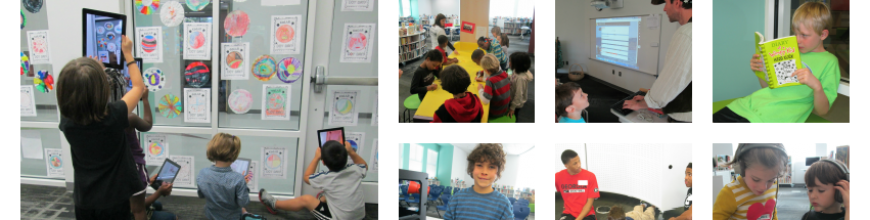
Hour of Code 2014: Scenes from Day 5

2014 Day 5 (22)

Today has been filled with 3rd grade coding.  Ms. Hicks brought her Spectrum class to start the day off, and then those same students returned with their own class later in the day.  This gave these particular students 2 hours of code, so they were able to do both the Made with Code site and then launch into making Scratch projects by following the tutorials and then branching off on their own.  I love the structure of the Made with Code site and how it builds up to the openness of a tool like Scratch.  Students seem to better understand the concept of block coding after using the structure of Made with Code.

I know that the Made with Code site was made with girls in mind, but my own wish is that the site didn’t specifically talk about girls.  So many of our boys loved the site as well, but they were a little turned off when they saw the text on the site that specifically labeled the site for girls.  As long as they didn’t read the text, they were happily coding together.

Something else happened during today’s coding sessions.  Some of the teachers gave themselves permission to sit down and code with students.  All week, teachers have walked around and had great conversations with students about perseverance, coding, failure, and innovation.  However, very few have allowed themselves to code.

Sparkly Tree

Ms. Spurgeon was bubbling with excitement today as she coded the White House Christmas tree in her favorite color of pink.  Her excitement spilled over into the students at her table as they tried some of the things she was trying and watched her try different pieces of code.

It reminded me of the importance of learning along with our students and really showed me that I probably need to explicitly invite teachers to sit and code with their classes.  I can do all of the running around, talking, and nudging, but teachers should learn along with their students and consider how coding comes into their own curriculum.

Another new thing that happened today was that some students really stuck to the Scratch tutorials without trying to branch off on their own too early.  The ones that stuck with the tutorials really got some functioning projects off the ground during their hour of work.

Several of the 3rd graders branched off from the 3 holiday projects on Made with Code and tried some of the other projects.  They loved the beat creator.

As students made beats, they were naturally starting to think about lyrics or dances to go with their beats.  Their teacher happened to be standing nearby when I observed this so I suggested that they might write a rap that connected with some of their classwork.  Then, the teacher got excited and suggested a rap about habitats in science.  It will be interesting to see if this takes off in class or not, but students were certainly interested in creating beats and putting in some work to write a song.

4th grade closed out our day with all kinds of coding.  The experience with coding was the most varied in this grade because several students had used coding in projects last year.  I showed several resources and turned them loose to see what they could do.

This year’s hour of code has been so much fun and was a big improvement over last year.  Next year, I hope to do even more.  I would love to involve families at some point.  I’ve seen several schools hosting parent coding nights, so perhaps we will look at that for next year.


Hour of Code 2014: Scenes from Day 3 & 4

2014 Day 4 (7)

Days 3 and 4 have been filled with lots of young learners for hour of code.

Kindergarten class have continued to come to use the iPad app The Foos.  In each session, we start by talking about the word “code”.  Lots of them mention passcodes on iPhones and codes to get into gates or buildings.  We link this to the idea of giving a computer a code.  Then, we watch the video from President Obama.

Before we start the app, we talk a lot about how coders don’t give up, they try small pieces and test, and they collaborate when needed.  The teachers and I have made some interesting observations about students while they are coding with The Foos and other coding tools.

1.  Students who might easily give up or struggle with other subject areas in school are fully engaged and putting forth tremendous effort when coding, while others who like to get things right the first time are easily frustrated.

2.  We talk a lot about stamina at our school and how long you can spend working at a task whether it’s math, reading, or something else.  The stamina of students in coding is very high.  Working for almost an hour was easily obtainable by most students regardless of age.

3.  Students who might not normally share their thinking with other students in order to help or collaborate were very willing to share their coding strategies.

4.  Some students still needed some direct instruction or nudges.  With the Foos in particular, I noticed students repeatedly pressing the run button in order to get a character to move rather than write enough code to make it happen with one click.  I observed students repeating the same code over and over that wasn’t working and never trying something new.  There is a lot to learn from tinkering, but it is still essential and necessary for a teacher facilitator to step in with some instruction, tips, or nudges.

In addition to the Foos, we had 2nd graders who continued to enjoy using the Made with Code site.  They loved programming a yeti to dance, but they thought it was super cool to be able to program the lights on the White House Christmas tree and actually schedule their code to light up in Washington.

Our preK students had a blast using the Sphero draw app to practice drawing shapes and programming Sphero to drive around the carpet in their shape.  You can read more about that here. 

Finally, we’ve been having an interesting occurrence in our makerspace.  It started with a couple of students asking if they could come in during their recess to build and program a robot.  Then, another student asked.  Before I knew it, the word was spreading and more students who were new to making were showing up during recess.  It’s sort of like an underground movement.  It’s exciting, but I’m trying to figure out how to manage it.  Just today, a student came in on her own, designed an object in Tinkercad, exported it to Makerware, uploaded it to an SD card, and began printing it on the 3D printer.  Another student uploaded a file to Thingiverse that he made at home and prepped his own file for printing.  Two students started assembling a robot and pooling their knowledge to create the code that lived up to their vision for what the robot can do.  Another new student appeared, and started tinkering with how to program Sphero.

Students want to dream, tinker, create, and share.  I’m thankful that our library is a place that they can do that.  Hour of code once again opens my eyes and teachers’ eyes to what students can do.

Hour of Code 2014: Scenes from Day 2

2014 Day 2 (29)

Day 2 was a whirlwind with back to back class all day from 8AM until 2:30PM.  Once again, it was a day filled with perseverance, collaboration, and celebration as students figured out how to create pieces of code in apps and websites and run them.

Kindergarten and 1st grade continued to use the app “The Foos” by CodeSpark.  Today, I gave better instruction encouraging them to write the shortest code they could think of in order to get their character to capture the star.  We also did a few examples together by displaying the iPad on the screen.  This helped us to think about problem solving, trying something different, and visualizing the actions we wanted our character to take before we wrote code.

Our 2nd grade classes tried out block coding by using the Anna and Elsa snowflake game on Code.org as well as the Angry Bird and Flappy Bird game.  Once again today, the Code.org site was slow.  It didn’t crash, but it was still so slow that students were discouraged.  We visited it when we could, but we focused more of our time on Google’s Made with Code site.  This site was created to encourage girls to code, but we’ve found that it’s really a site for everyone.

Made with Code_Google

Students chose from 3 block coding activities:  making a yeti dance, creating a White House light show, and designing an animated snowflake.

Made with Code_Google choices

This was such a great tool for 2nd grade because it walked them through each step of adding blocks and then they could make adjustments to create various effects.  It was a great stepping stone to move on to something like Scratch or Scratch Jr.  In fact, we looked at Scratch at the end of each session and students better understood all of the menus in Scratch because of what they learned on this coding site.


Finally, the entire 5th grade came in for a coding extravaganza.  It was loud and productive.  They tried the three Scratch tutorials on Code.org

Get Creative with Coding   Imagine  Program  Share

Several students also used Made with Code to create more dancing yetis and lights.  I have a feeling that many of these students will be coding on their own tonight, in class, and over the winter break.