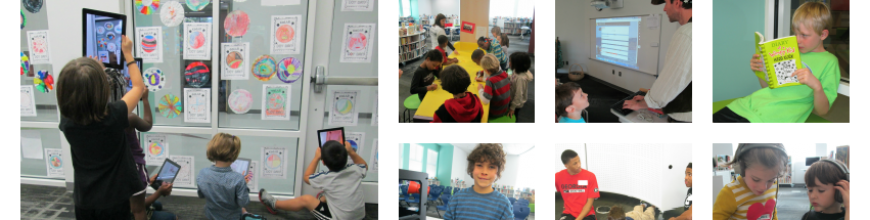
Kindergarten Researchers in Action

Planet Research (4)Ms. Kelly Hocking’s Kindergarten class is hard at work again.  They were so excited by what they discovered using the Storykit app, that they decided to continue their work by making their own nonfiction book.  Their last adventure was about creating their own versions of folktales.

You can read and listen to their folktales online:

Ms. Kelly’s class has been very curious about space, so they decided as a class that they would work on creating informational books about the planets and solar system.  Ms. Kelly put the students into groups of 2-3 and each group chose a planet or part of the solar system to research.

Planet Research (11) Planet Research (5)

In the library, I pulled our books about space as well as checked out some books from the public library.  I also setup 2 computer areas.  One area was focused on PebbleGo and the other area focused on TrueFlix.  Even though the content of TrueFlix is written for older students, I felt like the read aloud function would support Kindergarten researchers.

Planet Research (3)

In class, students filled out a KWL chart to bring to the library.  When they came to the library with their questions, Ms. Kelly and I did a quick intro to the 3 areas available to them.  I loved how Ms. Kelly set a realistic goal for students in this big venture.  She said, “I want you to have at least one fact written down before you leave today”.  Of course, most groups wrote more than 1 fact, but every group left the library with a successful experience of meeting their expected goal.  To support students in their research, Ms. Kelly, a parent volunteer, and I rotated among the groups to help students with navigating the information in front of them.  Students continued this research for the next week in class.

Planet Research (8) Planet Research (6) Planet Research (1)

Next, the students came back to the library to work on prep for their book production.  Their KWL charts were filled with facts that they had discovered.  Ms. Kelly even shared that some groups had conflicting information about the order of the planets, so they had done some fact checking as a class before they came.  During this 2nd library session, we started in the floor again to establish our expectations for the day.  Every group had small squares of white paper, a long sheet of lined paper with room for illustrations, and a pencil.

Planet Research (9)

The task was to sort through the KWL chart and identify the facts that would go into the finished book.  One fact was written onto each piece of white paper.  The whole group worked on this part.  Ms. Kelly, the paraprofessional, and I circulated among the groups to assist with reading the KWL charts, correcting spelling, and searching for additional facts if needed.

Once 4-5 facts were identified, students sequenced the facts into an order that made sense.  Again, the adults helped students read aloud the facts that they identified and facilitated sorting the facts into different orders until a final order was chosen.  Then, the adults taped the papers to the larger lined paper.

Planet Research (9) Planet Research (10) Planet Research (2)

If students had time, they thought about what they could use in the school to photograph for each fact on the sheet.  They made notes or drew a picture to remind themselves what they talked about.  Ms. Kelly ad I encouraged students to stretch their brains to think about what they could creatively use to take a picture.  One group had a fact about the crust of their planet.  They decided they would take a picture of a piece of pizza in the cafeteria and draw an arrow to the crust.

Students will continue this process in class throughout this week.  Next week, they are checking out iPads to photograph things around the school as well as type their text into Storykit and publish their own ebooks.  I can’t wait to see how their work turns out.  I will most likely push into their class at some point next week to help, or they may schedule a time to come work with me again in the library as they finish their books.

Projects like this show me that it is completely possible for our youngest students to create amazing work that is based in real facts.  They can explore technology that no other class has attempted.  Some of the key factors in a successful project are plenty of time, realistic expectations, adult and peer support, and lots of encouragement.  I love how Ms. Kelly doesn’t rush a project of this size.  She understands that for quality work to be produced, we must give students the space, the support, and the time to make the work happen.

Read for the Record 2013

read for record (2)What fun!  Today we participated in Jumpstart’s Read for the Record.   Since 2006, Jumpstart has been encouraging people around the world to break the record for the most people reading aloud the same book.  This year, the book was Otis by Loren Long.  We Give Books provided free access to this book for anyone who wanted to read it online.  At the same time you were reading for the record, you were also supporting book donations around the world.

Today, 4 classes at Barrow participated in the media center, while some others read the book in their own classrooms.  Each class was a bit different in what we did with the book.

Mrs. Clarke’s PreK class is studying cooperation.  We used Capstone’s PebbleGo Social Studies database to learn about the word cooperation.  Then, we gave examples from our own lives and classroom of how to cooperate.  As we read Otis aloud, we talked about how cooperation was shown in the book.  We also talked about how we were cooperating with people all around the world to read for the record.

Read for the Record through the years.

In Mrs. Watson’s 1st grade, we looked at the data  from Read for the Record through the years.  We also read about tornadoes on PebbleGo and made connections to Otis and the Tornado.  1st grade is studying weather along with their study of The Wizard of Oz so Otis and Otis and the Tornado were a perfect fit.

In Mrs. Wright’s 2nd grade class, we Skyped with Mrs. Lussier in Connecticut.  We had also connected with her 4th grade students during Talk Like a Pirate Day, so it was fun to reconnect.  We took turns reading pages in the book and then added to a friendship padlet.  Since October is bullying awareness month, we used Otis to talk about being kind and showing friendship rather than bullying.

Showing pictures to Mrs. Techman's students.

Showing pictures to Mrs. Techman’s students.

In Mrs. Ramseyer’s 2nd grade class, we Skyped with Mrs. Techman in Charlottesville, VA.  I read the entire book to both classes and shared the pictures on the camera.  Our students stopped along the way and made predictions for one another.  We also took some time to tell about our own communities.  We looked at a map of how far away VA is and how long it would take to walk or drive.  Students wanted to know how long it would take to fly, so we pulled up a travel website and searched for a flight.  We also took time to add to the Padlet in this class, and Mrs. Techman’s class will add to it tomorrow.  Friendship Wall

While all of this was going on, I also tweeted the link to the padlet.  It was retweeted numerous times, so hopefully others will add to it.  Shawn Hinger and her students at Clarke Middle in Athens took time to add their own thoughts on friendship.  It was nice to have a middle school voice among the elementary ideas.  Andy Plemmons (plemmonsa) on Twitter

Once again, I was amazed by the power of connecting and how many standards can be woven into an event such as this.  I can’t wait to see what the record was set at today!


Exploring Culture

A sketch of how water is used in our lives

Today, first grade continued their exploration of culture, which is a part of their social studies standards.  In our first lesson, we thought about our day from the time we get up until the time we go to bed.  Then, we read the book One World, One Day.  We used the photographs and text to compare and contrast the day around the world with what a day is like in our own cultures.

Today’s lesson focused on water around the world.  Students began by drawing and writing how they use water in their own lives.  We move to the floor and read the introduction to Our World of Water: Children and Water Around the World.  Then, we moved to computers and used PebbleGo to explore all of the resources available in the earth database about water.  

I really liked the movement from drawing/writing to listening to using technology to read/listen.  These kinds of experiences are what I hope to repeat in many lessons this year as I try to provide transliterate experiences for the learners in our library.

This slideshow requires JavaScript.

Kindergarten Research…so many firsts!

While the rest of the school is working on persuasive writing, our Kindergarten is working on informational writing.  The teachers and I met back in December to plan some goals that we had for student research of informational topics.  It was important to each of them that students have experience locating information in a variety of places, but to specifically look at content that matched their developmental and reading levels.  Our print collection in the media center already has a variety of texts on a variety of levels, so I felt like they would find enough resources in the nonfiction section that would meet the needs of several topics.

The challenge came with finding a digital resource that would meet their needs.  We have access to great databases such as Encyclopedia Britannica in our state Galileo database, but even Britannica didn’t seem to get at what we wanted.  Fortunately, we were able to get a one-month trial of PebbleGo from Capstone.  PebbleGo has three main databases: animals, earth and space, and biographies.  The content targets a K-2 audience, but I’ve found that the topics are appropriate for all of our grades and really match the reading needs of many of our readers.  The content is broken down into headings and students have the option of reading the content themselves or having a professional narration read to them.  There are also videos, charts, maps, timelines, and more within each heading.

Kindergarten chose to do a beginning stage of research by assigning all students similar topics within their science standards.  Some students learned about rocks while others learned about soil.  In our collaboration, we decided that they needed a very basic graphic organizer.  We chose a four square organizer with the topic in the middle surrounded by 4 questions that students would answer.  They could answer the questions with text or even draw pictures in the spaces.  Each teacher booked a one hour lesson.  I introduced PebbleGo and how research is all about asking questions.  Students generated some sample questions about rocks before I showed them the 4 questions they would explore.  I briefly clicked through the pieces of the site and showed the feature that would read the content to students.  We also looked at the 4 questions and thought about which tab would answer which question.

When students seemed too saturated with information, we moved to the computer lab where PebbleGo was already loaded on their screens.  I was immediately amazed at the level of engagement but also the number of firsts.  For so many students, it was the first time using a mouse, a keyboard, the internet, a graphic organizer with set questions, and more.  It was easy to get overwhelmed by the number of questions that students were asking, but when I stepped back and took a deep breath, I was amazed at how excited the students were.  I was amazed by what they were remembering from what they heard regardless of whether or not it made it onto the graphic organizer.  There were 4 adults helping students:  the teacher, student teacher, my paraprofessional, and me.  We knelt down beside students and had conversations about listening to information more than once, writing down keywords rather than complete sentences, using a graphic organizer, and more.  In the end, students left with several facts written down about rocks and soil, but they also left with excitement about coming back again to use the computer for research.  When we checked in with them at the end, every student said they wanted to come back for more.

The teacher commented to me that this lesson just made her want to use the computer lab even more and how this was all a process.  In order for students to get better at researching and using the computer, they have to do it more.  It can’t just be a single lesson in the lab.  Wow!  Even though the lesson exhausted me at the very beginning of the day, it energized me with possibilities.

Our four square graphic organizer