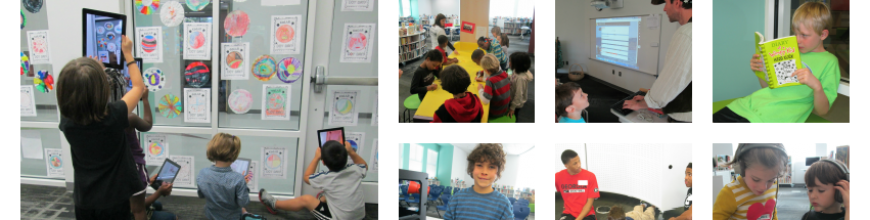
Kindergarten Researchers in Action

Planet Research (4)Ms. Kelly Hocking’s Kindergarten class is hard at work again.  They were so excited by what they discovered using the Storykit app, that they decided to continue their work by making their own nonfiction book.  Their last adventure was about creating their own versions of folktales.

You can read and listen to their folktales online:

Ms. Kelly’s class has been very curious about space, so they decided as a class that they would work on creating informational books about the planets and solar system.  Ms. Kelly put the students into groups of 2-3 and each group chose a planet or part of the solar system to research.

Planet Research (11) Planet Research (5)

In the library, I pulled our books about space as well as checked out some books from the public library.  I also setup 2 computer areas.  One area was focused on PebbleGo and the other area focused on TrueFlix.  Even though the content of TrueFlix is written for older students, I felt like the read aloud function would support Kindergarten researchers.

Planet Research (3)

In class, students filled out a KWL chart to bring to the library.  When they came to the library with their questions, Ms. Kelly and I did a quick intro to the 3 areas available to them.  I loved how Ms. Kelly set a realistic goal for students in this big venture.  She said, “I want you to have at least one fact written down before you leave today”.  Of course, most groups wrote more than 1 fact, but every group left the library with a successful experience of meeting their expected goal.  To support students in their research, Ms. Kelly, a parent volunteer, and I rotated among the groups to help students with navigating the information in front of them.  Students continued this research for the next week in class.

Planet Research (8) Planet Research (6) Planet Research (1)

Next, the students came back to the library to work on prep for their book production.  Their KWL charts were filled with facts that they had discovered.  Ms. Kelly even shared that some groups had conflicting information about the order of the planets, so they had done some fact checking as a class before they came.  During this 2nd library session, we started in the floor again to establish our expectations for the day.  Every group had small squares of white paper, a long sheet of lined paper with room for illustrations, and a pencil.

Planet Research (9)

The task was to sort through the KWL chart and identify the facts that would go into the finished book.  One fact was written onto each piece of white paper.  The whole group worked on this part.  Ms. Kelly, the paraprofessional, and I circulated among the groups to assist with reading the KWL charts, correcting spelling, and searching for additional facts if needed.

Once 4-5 facts were identified, students sequenced the facts into an order that made sense.  Again, the adults helped students read aloud the facts that they identified and facilitated sorting the facts into different orders until a final order was chosen.  Then, the adults taped the papers to the larger lined paper.

Planet Research (9) Planet Research (10) Planet Research (2)

If students had time, they thought about what they could use in the school to photograph for each fact on the sheet.  They made notes or drew a picture to remind themselves what they talked about.  Ms. Kelly ad I encouraged students to stretch their brains to think about what they could creatively use to take a picture.  One group had a fact about the crust of their planet.  They decided they would take a picture of a piece of pizza in the cafeteria and draw an arrow to the crust.

Students will continue this process in class throughout this week.  Next week, they are checking out iPads to photograph things around the school as well as type their text into Storykit and publish their own ebooks.  I can’t wait to see how their work turns out.  I will most likely push into their class at some point next week to help, or they may schedule a time to come work with me again in the library as they finish their books.

Projects like this show me that it is completely possible for our youngest students to create amazing work that is based in real facts.  They can explore technology that no other class has attempted.  Some of the key factors in a successful project are plenty of time, realistic expectations, adult and peer support, and lots of encouragement.  I love how Ms. Kelly doesn’t rush a project of this size.  She understands that for quality work to be produced, we must give students the space, the support, and the time to make the work happen.

Coding and Beyond with PreK Using Sphero, Osmo, iPads, Computers, and Books

PreK Coding (27)

I love it when a small seed of an idea turns into something much more.  A few weeks ago, I approached PreK about using our Sphero to practice writing letters.  I knew that PreK was working on forming the letters of the alphabet and I thought that the Sphero Draw and Drive app would be a perfect way to merge letter practice with some programming.  I originally thought that small groups might come to the library and use the Sphero with me, but further brainstorming with Ms. Heather resulted in us deciding to do 5 centers that students would rotate through in order to experience many technology, math, and literacy experiences.

Ms. Heather’s class has been bubbling with excitement about coming to the library to try out all of these centers.  Ms. Heather split the class up into 5 groups which was 4-5 students per group.  Ms. Heather, Ms. Melissa (parapro), Ms. Callahan (parent), and I all led a center and one center was independent.  Each center lasted about 10 minutes and took up about an hour with transitions. Here’s what they did.

Center 1:  Hour of Code programming with Sphero

Since this week is our hour of code, I was so glad that PreK got to experience an aspect of coding.  While coding didn’t fill up our hour, it certainly sparked their interest in how to make a computer or robot do what you want it to.  Students sat in a row and each took a turn to think of a letter to practice drawing.  Using the Draw and Drive app on iPad, students drew a letter and pressed play.  The Sphero drove around the carpet in the shape of that letter.  With a shake of the iPad, the letter was erased and the next student had a turn.

We repeated this process over and over until we were out of time.  Each time the robot rolled around the floor there was a burst of excitement.  As the facilitator, I asked students about the letters that they were drawing to make sure that they understood what they were trying to draw.

Center 2:  Osmo Tangrams and Words

Our Osmo devices are one of our favorite tools in the library.  The Osmo is came out this summer.  It includes a base to put the iPad in and a red attachment to place over the camera.  Osmo comes with 2 sets of tools to use with the apps: a set of letter tiles and a set of tangrams.  The three apps are free to download but you must have the base and attachment for them to work.  For this center, students used the Junior version of the Words app.  This app gives students a picture with a matching word.  The beginning sound of the word is missing and students have to lay the correct letter tile in front of the iPad.  If it is correct, the red attachment “sees” the letter tile and magically adds it to the word on the screen.  If it is incorrect, students have to try again.

Students also used the Introduction to Tangrams in the tangrams app.  This app shows students 2-3 tangram pieces pushed together.  For this beginning phase, the colors of the tangrams on the screen match the colors of the actual tangrams.  As students correctly place the tangrams on the table in front of the iPad, the red attachment “sees” them and fills in with black on the screen.  When they are all correct, a new combination is shown.

This center was one that needed adjustment as we went along depending on student needs and strengths. Some needed to focus more on the shapes while others were ready to think about letter sounds in words.  All students had a blast watching the magic of the Osmo happen on the screen and table.

Center 3: Starfall on Computers

Ms. Heather facilitated the computer center.  I put out a computer, mouse, and headphones for each student in the group.  One part of this center was simply using fine motor skills to practice using a mouse.  The other part was to use Starfall to continue practicing letters and sounds.

Center 4: Reading

A parent volunteer read aloud stories that I pulled.  The selections were Peanut Butter and Jellyfish, Job Site, and Stars.  She had students engaged in discussion about the story and the pictures all along the way.

Center 5: iPads

PreK has 5 iPads in each classroom.  Students have a variety of word apps that they can use at their own center time in class, so they are used to using these apps independently.  This made the perfect independent center since we didn’t have 5 adults.  Students sat on the bean bags by the windows and used the iPads by themselves for the 10 minutes of this center.

I think many times people think that our younger students can’t use technology or they are unsure of what to do with younger students.  I love giving things a go and seeing what happens.  We were amazed by students’ engagement and excitement today.  Some asked, “Can we do this every day?”  That was a sure sign of success.  When working with younger students, you have to think about what your barriers might be.  For us, we wanted smaller groups in order to have more adult support if needed.  We also wanted smaller groups so that students wouldn’t be waiting around since we only have 1 Sphero and 3 Osmos.  Using the teacher, parapro, parent volunteer, and me helped to make this possible.  You might have a different barrier, but I hope that you will consider what you might leap into with your youngest learners in your building.

Community Connection: An Author Visit with Donna Jo Napoli

I was recently reminded of how many opportunities for our students are probably hiding in our communities.  A parent reached out to our Kindergarten teachers and asked if they would be interested in an author visit with Donna Jo Napoli.  The teachers asked me about it, and I immediately jumped on board because author visits don’t just pop up everyday, epsecially with outstanding authors such as this one.  Donna Jo Napoli just happened to be in Athens to speak at UGA, and a parent at our school used to live down the street from her.  This parent said that she was willing to come in and speak to a class or the whole grade level.

I occasionally ask parents to share their talents and connections with us in the media center so that we can connect them to opportunities, but this made me think that maybe I should ask more often or that I should highlight ways people are supporting our students with exciting opportunities.

Donna Jo Napoli read her book Rocky the Cat who Barks.  She shared the process that it takes to get a book printed in physical form.  Students were also able to ask questions.  Many shared stories of their own pets or how they also wrote a book.  Along the way, we also learned about how much research and reading go into books such as Mama Miti.  Donna Jo spoke with passion about how she learned how much an ordinary person can make big changes in the world.  She encouraged the students to think about what they could do to change the world.  She also shared her thoughts about revision.  Her thought is that instead of writing one story over and over, you should write many stories.  Each time you write, share that story with a friend and have them tell you what they like and what they don’t like.  Learn from that, and use what you learned to write something new.  After you get several stories, pick one that speaks to you and spend more time making it better.

We also learned that she is doing a collaboration with author David Wiesner on a graphic novel.  We can’t wait to see how that develops!

What an amazing day for our Kindergartens.  Thank you parents and community members who reach out to schools and libraries to provide opportunities, and thank you Donna Jo Napoli for your amazing gift of story to our students today!