Crafting Opinion Writing with Puppet Pals in First Grade

puppet pals (7)

Almost every class in our school is doing some form of opinion writing at the moment.  Last week, 1st grade spent some time tinkering with the Puppet Pals app on the iPad to see how it worked.  We have also been reading books that feature some type of opinion such as The Sandwich Swap and Sylvia’s Spinach.

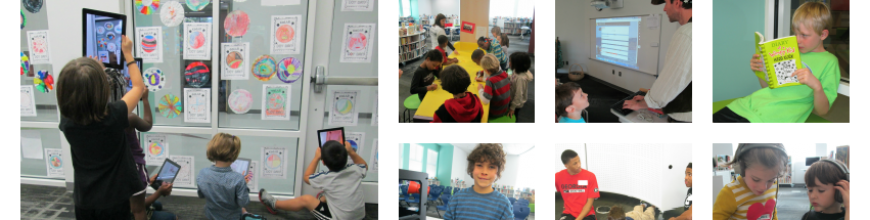
In class, the 1st graders have been writing an opinion piece, so they brought that piece of writing to the library to use the Puppet Pals app to record their script.  We started on the floor in front of the projector.  I projected an iPad and opened the puppet pal app.  I quickly went through the various screens and made sure everything still looked familiar to students from their tinkering sessions.

puppet pals (2)

Then, I showed the students a few extra steps they would need to do in order to save their video.  They would need to give their story a title and export the story to the camera roll on the iPad.  I also used this time to explain what my role for the day would be.  Since each class has about 20 students, twenty videos needed to be uploaded to Youtube and put into a playlist for the teacher to share in class and with families.  I really wanted this step to be done while the students were in the library, so I told the students that uploading videos was my only role during our work time.  The teacher was available to walk around and monitor and assist students who were recording, but more importantly, the whole class had expertise in Puppet Pals because of our tinkering and could help one another.  I encouraged them to ask one another for help if they got stuck so that I could focus on getting their videos uploaded.

During the work time, there was not a single student who came to ask me for help to use Puppet Pals.  There were certainly students who got stuck, but they relied on one another to figure things out.  I really saw the benefit of giving them time to tinker in the previous lesson.  They also were empowered to support one another rather than rely on an adult to help.

When they finished recording, they did their additional steps to export their videos and then formed a line in the middle of the library at my table.  I opened the video on the camera roll and selected to upload the video to Youtube.  I signed into my channel on each iPad.  The students helped me name the video and stayed until the video was uploaded.  Then, they went back to their work space and continued using Puppet Pals to tinker and try out a story of their own choice.

puppet pals (9)

Once all of the videos were uploaded, I selected them all in my account and added them to a playlist.

We worked for a full 45 minutes to record, upload, and continue tinkering.  There was little to no behavior problems.  Every student who had an opinion writing finished was able to film and upload a video.

Now the classes are thinking about a next step for Puppet Pals.  The students are very curious about creating a story with the characters in Puppet Pals, so I have a feeling that we will be crafting some narrative stories very soon.

Storybird Round 3

Ms. Carney’s Kindergarten Class came today to write storybirds in small groups.  Ms. Carney, Ms. Samuel, and I each facilitated a group and a parent volunteer rotated among the groups to assist as needed.  This class followed a similar sequence of lessons that other Kindergarten classes had followed.  Please see previous storybird posts for those details.

Here are their final results:

Pratt & the Pirates

Fluffy Bunny & Her Best Friend Frank

The Little Boy Lost in Space

The Black Cat Finds Friends

Election Centers 2012

October was busy!  I had big plans to do multiple kinds of election lessons with classes and time just slipped away from me.  Our school did a mock election through Youth Leadership Initiative.  I also did a storybook character election using “for president” books and a Google form.  Several classes are still completing that lesson this week and we’ll announce the storybook president on Friday.

Today, all of 4th grade came for an election lesson.  I put together an election pathfinder with various links:  information about the election, Youtube videos of the candidates and election analysis, interactive election games, electoral college interactive maps, candidate-matching surveys, and campaign sites.  Since our 4th graders now have 1 to 1 netbooks, they brought those to the library.  I did a quick intro on the carpet and previewed a few of the sites.  Then, students went to tables to choose which sites they focused on.

One of the most popular sites was the NY Times electoral college floating bubbles.  This site showed states that had already chosen their candidate vs states that were undecided.  For each state, the site listed reasons the state was decided or undecided.  Students could move the undecided bubbles to either candidate to see how that would impact the election.  Many were amazed at the number of states already decided based on previous voting and polls.

Another popular site was USA Today’s Candidate Match.  This site allowed students to take a stance on a variety of topics and see how that matched with candidates beliefs.  Students could even look at what the 2 candidates have said about the topic.  I loved seeing kids having discussions with adults and peers about the issues and choosing their candidates based on the issues rather than on popularity or what their peers were choosing.

Again, I was amazed at the level of engagement these students were able to sustain for an extended amount of time when they were offered choice and variety.  I even had election, president, and voting books on the table for those who were waiting on sites to load or those that were tired of the technology.  Very few of the books were used, but some students did find them valuable.

At the close of the exploration, I had students answer a Google form (also found on the pathfinder).  Students had to tell something they learned, tell if their opinion on the candidates had changed, and tell how many electoral votes it took to win.  I wanted a mixture of fact and opinion questions for the closing.  After students completed the survey, we came back to the carpet to see the results.  It was nice to quickly grab some facts from the spreadsheet to share rather than having students tell facts aloud.  It saved time and allowed students to be anonymous.  We ended with a brief conversation on being an informed voter.

Even though I didn’t get to do as much with as many classes as I wanted, I was proud of the impact that these resources had with our 4th grade students.  Now, I have sent the pathfinder link to the classroom teacher to push out to students through Edmodo.  They will continue to use these resources in class.

This slideshow requires JavaScript.

09