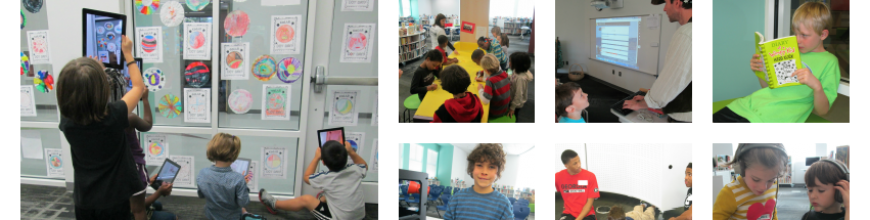
For 14 weeks, I’ve worked with a group of students in 2nd-5th grade to explore the world of making. We met every Wednesday for one hour. They used littleBits, MaKey MaKey, 3d printing, duct tape, cardboard, and robotics to dream up all sorts of things. Ultimately, they were supposed to offer a service to an authentic audience or create a product to show.
A few weeks into our clusters, Ms. Freeman, 5th grade teacher, asked if she could combine with our cluster. Her cluster was The Power of Code and focused on the many tutorials available on Code.org. What we both found was that each of our clusters had something that the other needed in order to create something truly miraculous. The coding students knew some things about programming and the maker kids knew some things about putting things together.
One example of a project that took off after our combination was a video game. A few students banded together to design their own video game. The plan was to create the program in Scratch, build an arcade game out of cardboard, and control the game using MaKey MaKey. The kids made great progress on their work, but they didn’t quite get finished. I hope that they sign up for open makerspace time to continue their work.
The last was to create a short video of our clusters to share at our school assembly.
This was an bright group of students to work with and I look forward to continuing to make and code with them the rest of this year and beyond. They have taught me many things.
Flipgrid is just an amazing group of people. At the end of our black history project, we held a Skype session with them to celebrate our work. It was very special for our students to connect with the entire team of developers of the app, but they had a big surprise in store for us. The Flipgrid team truly admired the work of our students and how they were using Flipgrid to get their voices out into the world, so they wanted to show their appreciation to the students by giving them a little celebration.
They mailed us a big pack of stickers to give to every student, a handwritten thank you note, and some funds to sponsor a little party for the students.
The students had a blast coming to the library to have a slice of pizza, a juice, an orange, and a Flipgrid sticker. We used this time to have a viewing party of our work and chat about our week.
Then, some of the students took a moment to send a thank you back to Flipgrid by recording some videos on a Thank You grid. We love our collaborative relationship with Flipgrid and look forward to using this tool for many more years to connect our voices with the world as well as unite our voices with the world.
Listen to our thank you’s by clicking the picture below.
A few weeks ago, Gretchen Thomas, UGA instructional technology teacher, emailed me about a possible collaboration on the UGA campus. She wanted to bring her Maker Dawgs class to the UGA Tate Center Plaza to host a popup makerspace. The idea would be to have a variety of maker tools available for UGA students to try on the spot. She wondered if I had students who might join them. Without hesitation, I said yes and we started the logistics. The more we planned, the bigger the trip got. The biggest news was that 2 members of the Flipgrid and Vidku team from Minneapolis flew down to do a video in our library. They wanted to go with us on our trip to see how students were getting their voice into the world and also how we planned to use Flipgrid to reflect on the day.
Our school is about a mile from the UGA Tate Center Plaza and our students have walking field trip forms on file so it was easy for me to create a field trip. The hard part was working out the logistics for bad weather. In true fashion, we had plan A, plan B, plan C, and maybe even a plan D. It was right up to the wire deciding about going to UGA, but the rain held off and we made our trek down to Tate.
Students had a little bit of time to explore the maker tools that Gretchen brought before we prepped all of our supplies for UGA students to explore.
Students connected Spheros to iPads through bluetooth, setup a wireless network with Justin & Greg from Flipgrid, and made a playable piano with Playdoh and MaKey MaKey.
Then, we waited. Traffic on the UGA campus quickly picked up at around 10:30 when classes changed, but most UGA students had their earbuds in and walked at a fast pace to get to the next class. The kids were a bit timid at first, but with some encouragement, they began to develop techniques to get UGA students to stop and try out our makerspace stuff.
Several students started driving the Spheros right into the paths of walking college students. At first, they dodged them, but eventually they started asking questions. Other students started experimenting with phrases to get the UGA students interested.
One student even put on silly costumes and made up dances to attract attention to our cause, and so many people loved his techniques!
It was really interesting to see the college students when they stopped. Most of them wanted the students to demonstrate for them how each piece of technology worked. They had to be nudged and encouraged to try them. It made me wonder if there is less of a culture of risk-taking in this age bracket than with our elementary students.
Halfway though our makerspace time, Gretchen’s Maker Dawgs class joined us and helped talk with UGA students, demonstrate tools, and document the day through pictures and Flipgrid.
We used Flipgrid part of the time just to capture some video of what was going on.
Ludwig and Kearn spent a lot of time showing people how MaKey MaKey could control a computer. They setup a piano and bongos that could be played with Playdoh, and they got several people to stop and try it out. It was fun to listen them explain the science behind how it works. When you touch the Playdoh and a piano plays, it seems like magic, but they did an incredible job of talking about circuits as they demonstrated the tool.
Many of our students worked hard to drive the Spheros around and demo them. I wish that our Sphero students had been able to get some UGA students to try programming the Sphero, but most were just in too big of a hurry. They mostly showed how you can use the Drive app to control the ball. Maybe next time, we can be prepared to demo alternate apps. However, they still had a good many students stop by and actually try out the ball after seeing how it worked. The kids loved talking about how it worked and being able to teach students who were much older than them.
Another group of our students spent time making some things from duct tape and then teaching UGA students how to make them too.
Others had a great time exploring littlebits, connecting blocks, and making friendship bracelets.
As our popup makerspace came to a close, we used Flipgrid to reflect on what we had learned.
It was truly an amazing day of getting our students out into the world to share their knowledge and pass on their passion for makerspaces. Gretchen was able to promote her UGA class. We were able to show what’s happening in K-12 education right now with makerspaces. Our students were empowered by the chance to be the experts in the room. Gretchen and I are already brainstorming what this might look like next time.
Many thanks to Greg and Justin from Vidku and Flipgrid for tagging along and helping to document our day.
Last year, I tried something new with the 2nd grade. My library schedule was packed and it was hard to get all 4 classes on the calendar, so I used Google Hangouts to teach all 4 classes at one time. It was an experiment, but it proved to be a lot of fun and also showed the students and teachers how to use a Google Hangout and collaborate on a Google doc.
This year, we planned it again and added on a few layers. One of our favorite kinds of poems to write is list poetry. You take a list and add descriptive words to each item on the list so that the reader can experience the items on the list. Our goal in our Google Hangout this time was to learn about list poetry, hear a mentor poem, practice list poetry together, and then create one collaborative list poem.
In advance, I setup a Google Hangout on Air.
I sent the link to the hangout to all of the teachers participating in the hangout. I also created a blank Google Doc for our collaborative poem and shared editing rights with all 4 teachers.
I gave the blank doc a title and wrote each teacher’s name inside the doc to create a space for each class to add to the collaborative poem without writing on top of one another.
On the morning of the hangout, I emailed teachers a reminder that included the link to the doc as well as the direct link for joining as a participant in the hangout.
At hangout time, I went in my office and awaited the classes. As they entered, I did a sound check to make sure microphones were working. Then I used the control panel in Hangouts to mute all of their microphones to eliminate feedback.
I opened our lesson by reading from Falling Down the Page, list poems collected by Georgia Heard. We focused on “In my Desk” by Jane Yolen. I pointed out how she gave describing words for each item found in her desk so that we would be able to picture it or experience it. I built on the reactions of students to the line about a “great big hunk of rotting cheese” found in a lunch box. These kinds of words cause us to react which is exactly what we want in a poem.
Next, I opened up a blank doc and started writing a grocery list: bread, milk, eggs, cereal. Then I assigned each word to one of the 4 classes and had them brainstorm describing words to add to each item on my list. Each class had a chance to speak in the hangout as I added our words to the poem.
Finally, I invited all of the classes to work on a collaborative poem about things under our beds. Each teacher facilitated the work in their own classrooms. I checked in from time to time to give an update on when we would stop working. Then, each class read their stanza of the poem to close out our time.
While we were writing, I invited people on Twitter to watch the doc in construction. We had lots of viewers engaged in our work in progress, and students loved being published authors with one tweet.
This lesson certainly saved me time in the library to give to other classes who needed a lesson, but it was much more than that. Rather than having each class in the grade level feel isolated, this lesson allowed them to unite together to create a piece of writing that immediately reached an audience outside of our school. It allowed us to collaborate within the walls of our school without the disruption of shuffling kids from class to class. It gave each class a space to think and work with one another and also a space for all classes to work together. I don’t think that every lesson would work in this type of setup, but it does make me curious to think about when this type of learning is the better choice than scheduling each class individually.
Under My Bed
By Barrow 2nd graders
Under my bed you will find…
(Yawn’s Stanza)
Slimey Socks
Lost High Fives
Stuffed animals, toys, and books
Scraps of paper
Remote control plane
Hairy, mad Tarantula
Dusty Boogers
Junky Legos
Clothes and shoes and jackets
Hairy Monkey Eyes with a big chin
Tv, coke can, and baseball cards
Football cards and a zipline
Dirty underwear, rotten bread, and an old sandwich
(Ramseyer’s Stanza)
Two fat picture books
A fake diamond sword
My playful black kitten
Giant Lego parts
Huge dead bugs in the corner
A stinky, rainbow sock
A blue crate filled with Adidas shoes
A chewed up puppy stuffed animal
(Brink’s Stanza)
Hiding under my bed with my big, hairy monster
you will find
smelly dead cockroaches and dust bunnies
old paper candy wrappers
a big purple three horned monster
basketball shoes
an empty shoebox and an old toy
a skeleton reaching for water
a stinking mummy, rotten eggs, and a stinky sock
cuddly stuffed animals
a golden chair, medals, trophies
smooth rocks I found in the street
lost, overdue library books
a racing track
paper plates
(Wright’s Stanza)
Under my bed, I look and see
Flattened books
moldy food
cute and sleepy puppies
old broken legos I used to play with
misplaced and forgotten toys
and ripped, dirty money
So many things under my bed.
Following this lesson, I did a very similar lesson with one Kindergarten class in person. We didn’t do the hangout, but we did share our work with the Internet so that students’ voices were already reaching an audience even in their beginning steps of writing. It was so much fun to get a comment from one of the viewers of the doc.